 Quven
Quven'%3e%3cpath%20d='M0%200v40h60V0z'%20fill='%23012169'/%3e%3cpath%20d='M0%200l60%2040m0-40L0%2040'%20stroke='%23fff'%20stroke-width='8'/%3e%3cpath%20d='M0%200l60%2040m0-40L0%2040'%20clip-path='url(%23d)'%20stroke='%23C8102E'%20stroke-width='5'/%3e%3cpath%20d='M30%200v40M0%2020h60'%20stroke='%23fff'%20stroke-width='13'/%3e%3cpath%20d='M30%200v40M0%2020h60'%20stroke='%23C8102E'%20stroke-width='8'/%3e%3c/g%3e%3c/svg%3e)


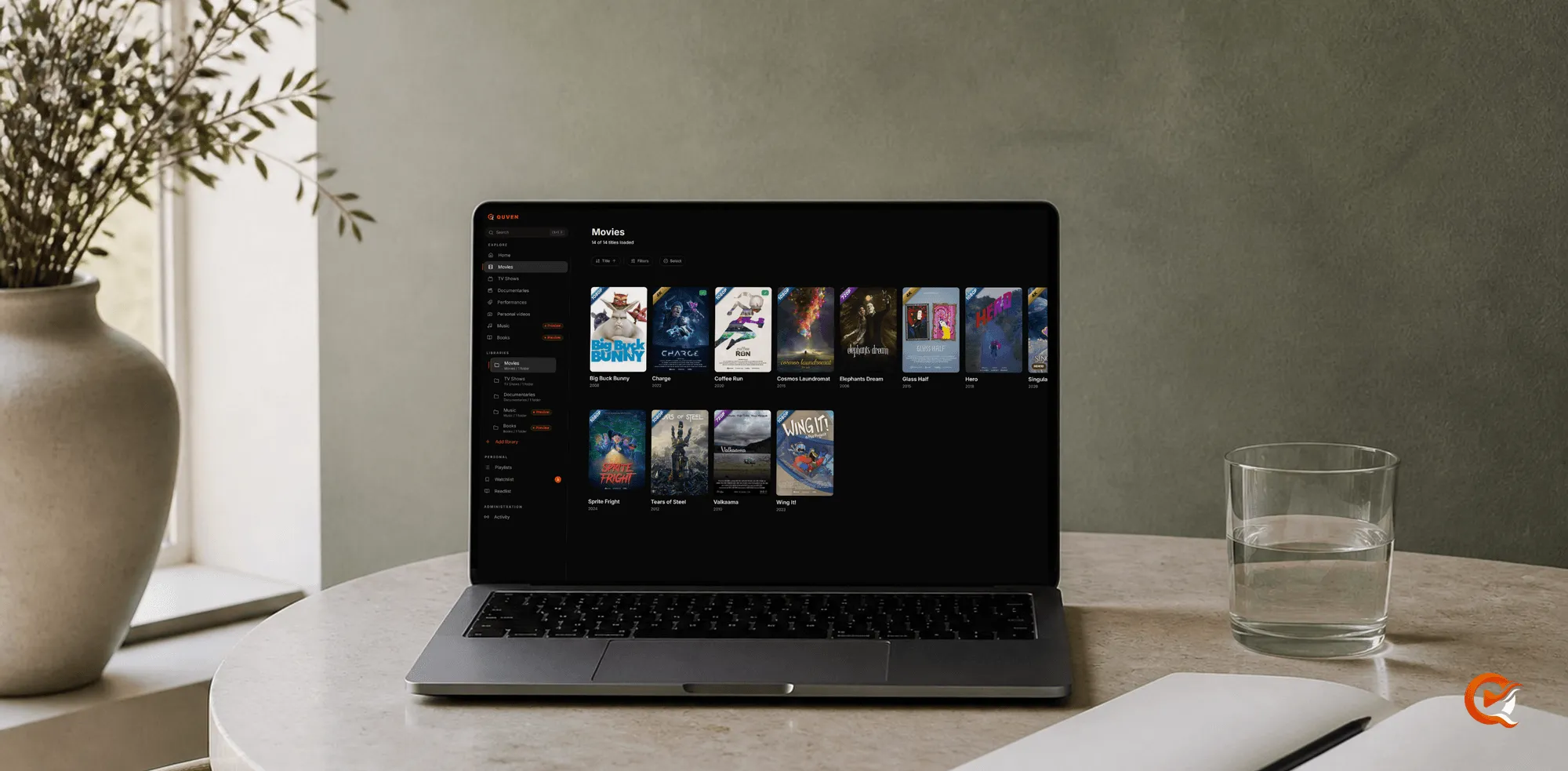
Most people come to Quven with a library that already exists: a few external drives bought at different times, a folder structure that made sense in 2014, the same film in two or three versions, and a NAS where two folders are both called Archive. Quven is built to read that as it is. It doesn’t ask you to rename anything first, and it doesn’t rearrange what it finds.
Reading a library is not taking it over
You point Quven at folders, and it builds a catalogue from what’s in them and stores that catalogue separately, so the files keep their names and their places:
- Add the folders as libraries, one library per kind.
- Start a scan. Although Pro can also watch the folders or scan on a schedule you choose, on the Free plan a scan only happens when you start one.
- Open the catalogue and look at what Quven made of it, then walk away if you like: nothing has changed on disk.
If you stop a scan halfway, does the next one start from the beginning? It continues from where the last one got to, which matters when you’re trying a new server.
The difficult cases
The awkward cases are the same in every library: a remake with the same title and roughly the same year as the original, a local release title that belongs to a different film in the catalogue, and a second copy of a film you already hold. Quven matches against four catalogues (TMDb, TVDB, OMDb and AniDB), and the matcher copes with release-group naming, years that are off by one and the character substitutions people use to make a title unsearchable.
When it isn’t confident, it doesn’t guess:
- The title goes into a review inbox, where you confirm or correct it yourself, and a library’s worth usually takes one sitting.
- For what’s left, such as two candidates with the same score or a filename with nothing useful in it, Match with AI reads what the file itself says, from its name and folders to its length and languages, and asks the catalogues again. It comes with Pro, Max or Lifetime, and an answer whose title or running time doesn’t fit the file will go back to the inbox instead of being written.
Is a second copy a version or an edition?
The file name tells the scan which one it has found:
Films/
  Blade Runner (1982)/
    Blade Runner (1982) - 2160p HDR.mkv
    Blade Runner (1982) - 1080p SDR.mkv
Blade Runner (1982) {edition-Final Cut}.mkv- The two copies without a marker are versions of one title. They share a card, a watched mark and a resume point, and the film’s Versions button lets you see which is the 4K and which is the 1080p before you start it.
{edition-Final Cut}makes that cut an edition, a title with its own card, so finishing one cut doesn’t mark the other as seen.- The Duplicates filter lists every film you hold twice. Should one turn up as two cards, the guide to keeping two copies of a film shows how you can join them.
Correct the catalogue, not the archive
When an entry is wrong, you edit the entry. Edit metadata can change the name, the year, the overview, the genres and the poster from the desktop app or the web client, and Quven stores the correction beside the library, so the next scan won’t undo it and the file on disk keeps whatever name you gave it. Trailers, featurettes, deleted scenes and interviews are recognised as extras of the title they sit next to, whether they’re in a folder such as Extras or Trailers or their name ends in -trailer, -featurette, -deleted or -interview, and they stop showing up as separate films.
Then the Play button decides everything
A tidy catalogue can’t help if the file stutters, or if the audio track you bought the disc for gets replaced on the way to the screen. The native clients play what the file actually contains, and that’s where the difference between direct play and a transcode becomes visible. If a file has no subtitle at all, Pro can write one from the dialogue on your own server. The native apps draw a picture subtitle as it is on every plan, and with Max one can be read into text and translated into your language. If you’re moving from another server, the migration guide covers it.
Frequently asked questions
Do I need to rename my files before scanning?
No. Quven reads what’s there, and when something’s wrong you correct the catalogue entry. Consistent naming does help the matcher with obscure titles, and the organisation guide shows what helps most.
What happens to duplicates of the same film?
Each one stays with the film it belongs to, as a version or as an edition of its own, and nothing gets deleted for you.
Will a scan move or rename anything on disk?
No. A scan only reads. Corrections and artwork are stored beside the library with the watch state, which is why they survive a rescan and can be undone without touching a file.
How long does the first scan take?
It depends on how big the library is and how much metadata has to be fetched. It runs in the background with live progress, so the app stays usable, and if you cancel it, it’ll resume from where it stopped.
Community
Comments
0 comments
No comments yet. Start the conversation.