Quven
Quven'%3e%3cpath%20d='M0%200v40h60V0z'%20fill='%23012169'/%3e%3cpath%20d='M0%200l60%2040m0-40L0%2040'%20stroke='%23fff'%20stroke-width='8'/%3e%3cpath%20d='M0%200l60%2040m0-40L0%2040'%20clip-path='url(%23d)'%20stroke='%23C8102E'%20stroke-width='5'/%3e%3cpath%20d='M30%200v40M0%2020h60'%20stroke='%23fff'%20stroke-width='13'/%3e%3cpath%20d='M30%200v40M0%2020h60'%20stroke='%23C8102E'%20stroke-width='8'/%3e%3c/g%3e%3c/svg%3e)


Quven keeps two kinds of second copy apart. A 4K remux and a 1080p encode of the same cut are versions of one title: one card, one page, one watched mark. A theatrical cut and a director’s cut are editions, each with a card and a history of its own. The file name tells the scan which is which, and the film’s page corrects whatever it read wrong.
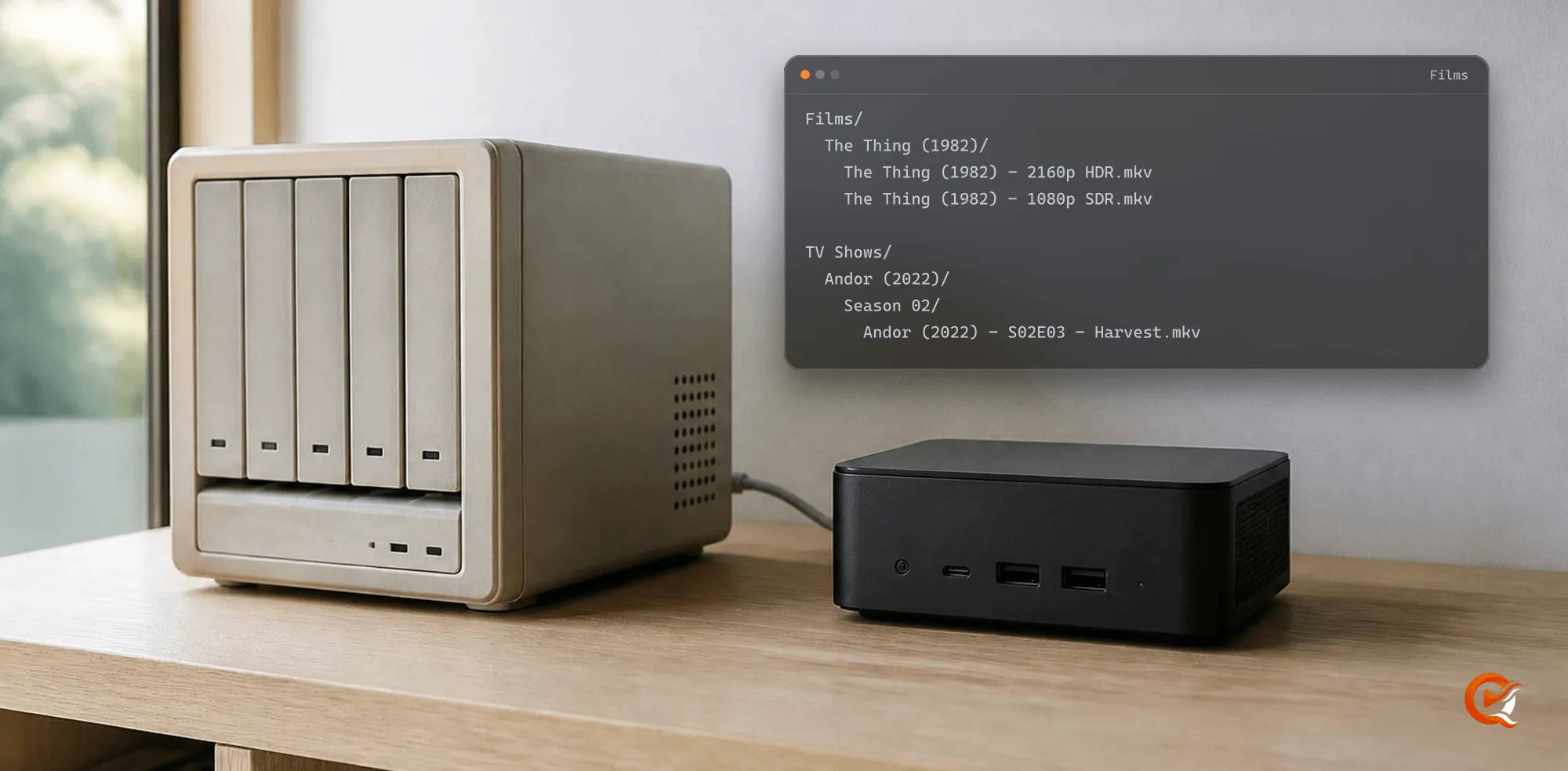
1. Put the copies of one cut side by side
Films/
  The Thing (1982)/
    The Thing (1982) - 2160p HDR.mkv
The Thing (1982) - 1080p SDR.mkv- A file that matches a film the library already holds, and carries no edition marker, joins that title as a version. The match decides, inside one library; one folder per film just keeps it readable for you.
- Both copies share the resume point, the watched mark, your rating and every playlist entry, since those belong to the title.
- The resolution in the name is for you. Quven reads the picture size from the file itself.
2. Choose the copy that plays
Without a choice, Play opens the copy with the largest picture, then the newer codec, then the larger file. To play another one:
- Open the film’s page in the desktop app or the web client.
- Press Versions.
- Pick a copy and press Use as source. Choosing a source starts nothing, so press Play afterwards.
The iPhone, iPad and Android apps carry the same Versions button, which opens Choose version. On a screen that can’t show HDR, the SDR copy plays as it is, where the HDR one would have the server convert the picture on the way.
3. Give a different cut a card of its own
Films/
  Blade Runner (1982)/
    Blade Runner (1982) {edition-Final Cut}.mkv
Blade Runner (1982) {edition-Theatrical}.mkv{edition-Name}anywhere in the file name makes that cut an edition: a title of its own on the same catalogue entry, its card carrying the name as a badge. A copy with no marker is the standard edition.- Each edition keeps its own watched mark, so finishing the theatrical cut doesn’t mark the Final Cut as seen.
- Every edition’s page lists the others under Alternate editions. Go to edition opens that page and Play this edition starts it.
- The Edition filter of the catalogue narrows the grid to one cut.
- A 4K and a 1080p copy of the Final Cut take the same marker and become versions of that edition.
A 3D film whose name holds both 3D and its layout, such as SBS, Half-SBS or Top-and-Bottom, becomes a 3D edition by itself with Pro, Max or Lifetime. On the free plan it joins the 2D film as a version, {edition-3D} keeps it apart on every plan, and playing it costs nothing on any of them.
4. Join a film that shows up twice
Two cards for one film and one cut mean the second copy was matched to nothing, or to another film, usually because of a missing year or a release title.
- Open the page of the card that’s wrong.
- Choose Change match from its menu. A title still waiting for review offers Set match manually on its page instead, and in the desktop grid the card’s own menu calls it Change association.
- Search for the film the other card holds and pick it.
Quven moves the file under the title that already held that film, and the watch history of both cards goes with it. Nothing moves on the disk. Two editions never merge, and a film kept in two libraries stays a title in each.
5. Split a card that holds two films
The Duplicates filter lists every film holding two or more copies, bonus content left out. When some of them look like different films under one match, a line above the grid counts them and offers Review suspect movies.
- Press Review suspect movies to see each copy beside the title its name was read as.
- Detach the copy that doesn’t belong. It leaves as a title of its own, ready to be matched, and the file stays where it is. Identify with AI names it first, with Pro, Max or Lifetime.
- Where the copies really are one film, the desktop app’s Same film records that they belong together.
The same works from any film’s menu: Associated files, then Detach and re-match on the copy. That dialog also holds Delete from disk, which removes a copy for good, and Remove from library, which leaves the file on the disk and out of the next scans.
For the folder layout around all of this, read how to organise films and TV shows. Coming from another server? Bring the library across first and sort the copies once the scan has settled.
Frequently asked questions
Does a film with two versions count twice?
No. It’s one title and one card. The second copy shows under Versions and in the Duplicates filter.
Why does the director’s cut get a card of its own?
Watching one cut isn’t watching the other, so each edition keeps its own watched mark and resume point. Alternate editions links them on every page.
Will joining two cards lose a watch history?
No. The history of the card you change moves to the title that stays, and the files stay where they are.
Does this work for episodes?
Yes. Two copies of an episode stay one episode, and its menu offers Alternate editions to pick one. The Duplicates filter of the series catalogue lists every series with an episode held twice.