 Quven
Quven'%3e%3cpath%20d='M0%200v40h60V0z'%20fill='%23012169'/%3e%3cpath%20d='M0%200l60%2040m0-40L0%2040'%20stroke='%23fff'%20stroke-width='8'/%3e%3cpath%20d='M0%200l60%2040m0-40L0%2040'%20clip-path='url(%23d)'%20stroke='%23C8102E'%20stroke-width='5'/%3e%3cpath%20d='M30%200v40M0%2020h60'%20stroke='%23fff'%20stroke-width='13'/%3e%3cpath%20d='M30%200v40M0%2020h60'%20stroke='%23C8102E'%20stroke-width='8'/%3e%3c/g%3e%3c/svg%3e)


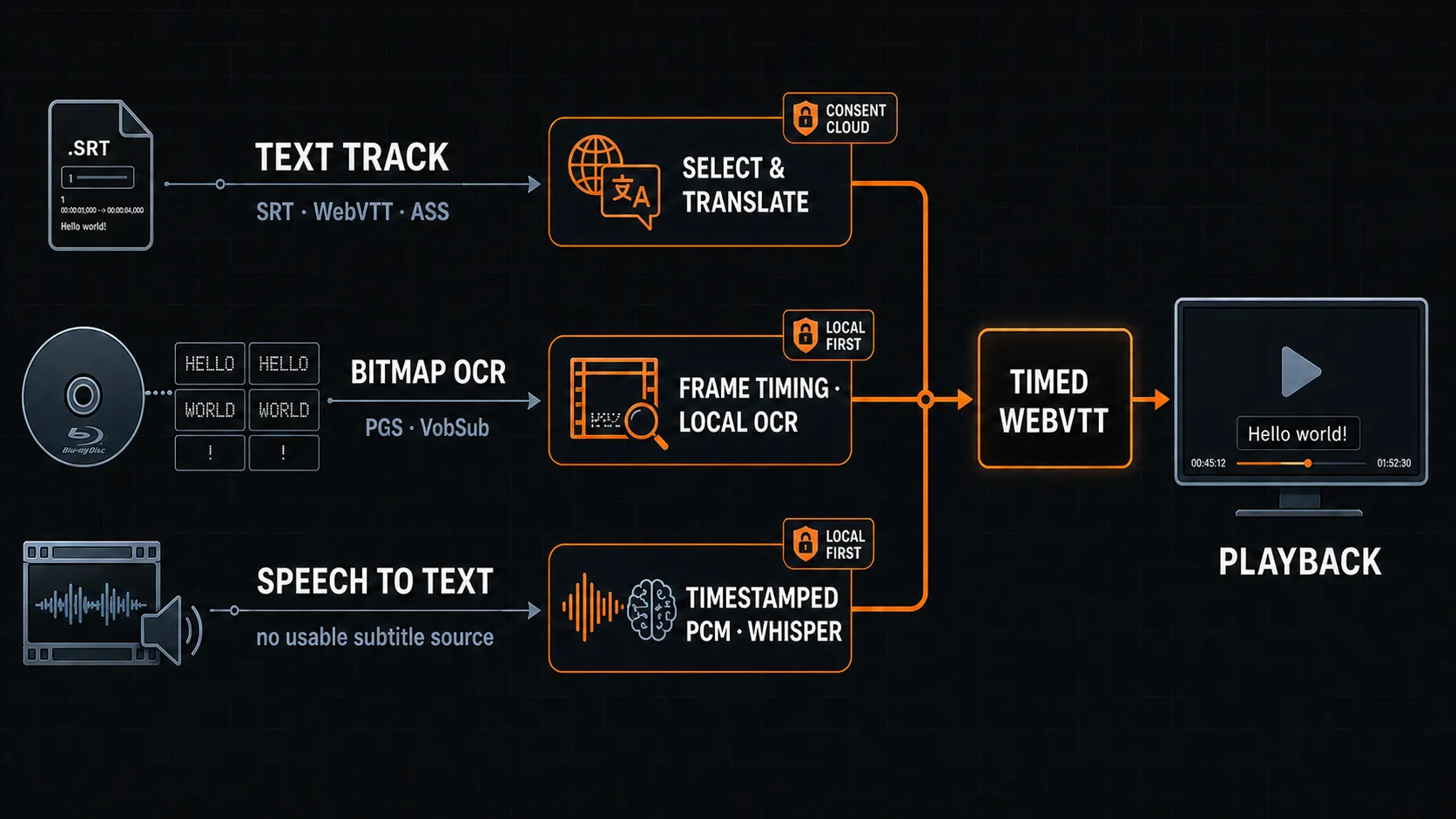
We’ve written before about how a media server ought to handle subtitles: translate the text tracks that already exist, run local OCR on the image-based ones from DVD and Blu-ray, and fall back to listening to the dialogue when a file has nothing usable at all. Three routes, each ending in a timed text track.
An architecture like that is only as good as its behaviour on real media, so we tested every route against real discs and real films. Three details decided whether the result was usable, and none of them shows up on a clean test file.
Pairing every PGS image with its cue
Although a PGS-only Blu-ray is the hardest first test there is, it’s the right one. The track holds no text, only images with timings, and the server has to pair every image with its cue before recognition can start:
- Read the stream with a larger probe window, because FFmpeg can’t work out the size of a PGS stream from the default probe.
- Build the filter graph from the subtitle’s own dimensions, not the video’s.
- Read the colour planes, since the decoder hands over paletted frames whose alpha plane reads as a flat zero while the glyphs live in the colour planes.
- Subtract the container start time, because FFprobe reports raw timestamps while FFmpeg rebases its output to zero.
The fourth step is the one that quietly shifts every cue if nobody accounts for it. On the disc we used the container started 79 milliseconds in, so every image would have landed early. With all four handled, the disc paired 984 of its 984 images with their cues, and the same correction lets VobSub pair by timestamp too, 73 of 73 on the DVD we measured.
We also considered scene detection to drop the transparent clear frames PGS emits between subtitles, and rejected it. But two consecutive cues with the same text score as no scene change, so one of them disappears, and a pipeline that silently loses a line of dialogue isn’t one you can trust.
Transcripts that keep whole sentences
The audio route has its own trap. A recogniser returns spans of speech, and a subtitle has to show them for a readable length of time, which are two different limits. Why keep them apart? Because the first is a fact about the audio and the second a choice about reading. Quven caps a cue at seven seconds on screen, but that cap belongs to the timing pass, which splits long cues at natural pauses and doesn’t decide where the text itself is cut, so a ten-and-a-half-second line of dialogue stays one sentence. Tests pin the two limits apart, and that’s why the transcript of a full film reads as dialogue.
Speech recognition on the graphics card
Transcribing a two-hour film on the processor alone takes about eight minutes and keeps every core busy, which isn’t something you’d want running in the background, and you shouldn’t have to. So recognition can run on the graphics card, with Metal on macOS and Vulkan on Windows and Linux, and on the NVIDIA card we measured the encode step went from 591 milliseconds to 15.7, while a two-hour film takes roughly two and a half minutes with the processor mostly idle.
Selection walks down a ladder: discrete GPU, integrated GPU, optimised CPU build, plain CPU build, so a machine with no usable adapter still transcribes, only more slowly. The discrete card is picked from the adapter list because the enumeration comes back in driver order, and on the CPU path Quven leaves at least one processor free.
What a translated subtitle looks like
We reviewed a complete translated episode line by line, all 740 cues, against the original. Around eighteen were imprecise, and about a dozen of those were worth a correction, such as an idiom that landed oddly or a continuity slip: a subtitle you can watch a film with, and the cue editor can handle the rest.
And the audio route did well too. The translation of a transcribed film came back complete, 1593 of 1593 cues with nothing empty and no leakage from the source language. What remains is the recogniser’s own ceiling, a line that’s grammatical and still not quite what the actor said, and that’s why an authored subtitle, when one exists, always comes first.
Which part comes with which plan
Generating a subtitle from the audio runs on your own processor and graphics card, and it comes with Pro, while a transcript already produced stays free to play for everyone who can open the title. But translation is different: the text leaves the machine and goes through a paid language-model provider behind a job queue that survives restarts, so every film carries a real, countable cost. That’s why AI translation comes with Max and Lifetime, with a weekly allowance shared by the servers linked to the account, and the plans page lists the details.
The practical versions are the guides on translating subtitles with AI and generating subtitles for a film that has none.
Community
Comments
0 comments
No comments yet. Start the conversation.