 Quven
Quven'%3e%3cpath%20d='M0%200v40h60V0z'%20fill='%23012169'/%3e%3cpath%20d='M0%200l60%2040m0-40L0%2040'%20stroke='%23fff'%20stroke-width='8'/%3e%3cpath%20d='M0%200l60%2040m0-40L0%2040'%20clip-path='url(%23d)'%20stroke='%23C8102E'%20stroke-width='5'/%3e%3cpath%20d='M30%200v40M0%2020h60'%20stroke='%23fff'%20stroke-width='13'/%3e%3cpath%20d='M30%200v40M0%2020h60'%20stroke='%23C8102E'%20stroke-width='8'/%3e%3c/g%3e%3c/svg%3e)


The subtitle menu is a good place to test how solid a media server’s playback really is. Open it on a Blu-ray remux, try to translate the only decent track, and you find out quickly how much of the pipeline behind it was improvised. It’s the test we set for Quven.
Every product page says “subtitles supported”. But with a remux whose only decent track is PGS, that checkbox can mean a buffering video, an empty subtitle stream or a track that drifts halfway through the film. So which source reaches which client, and what does the server do when it isn’t plain text?
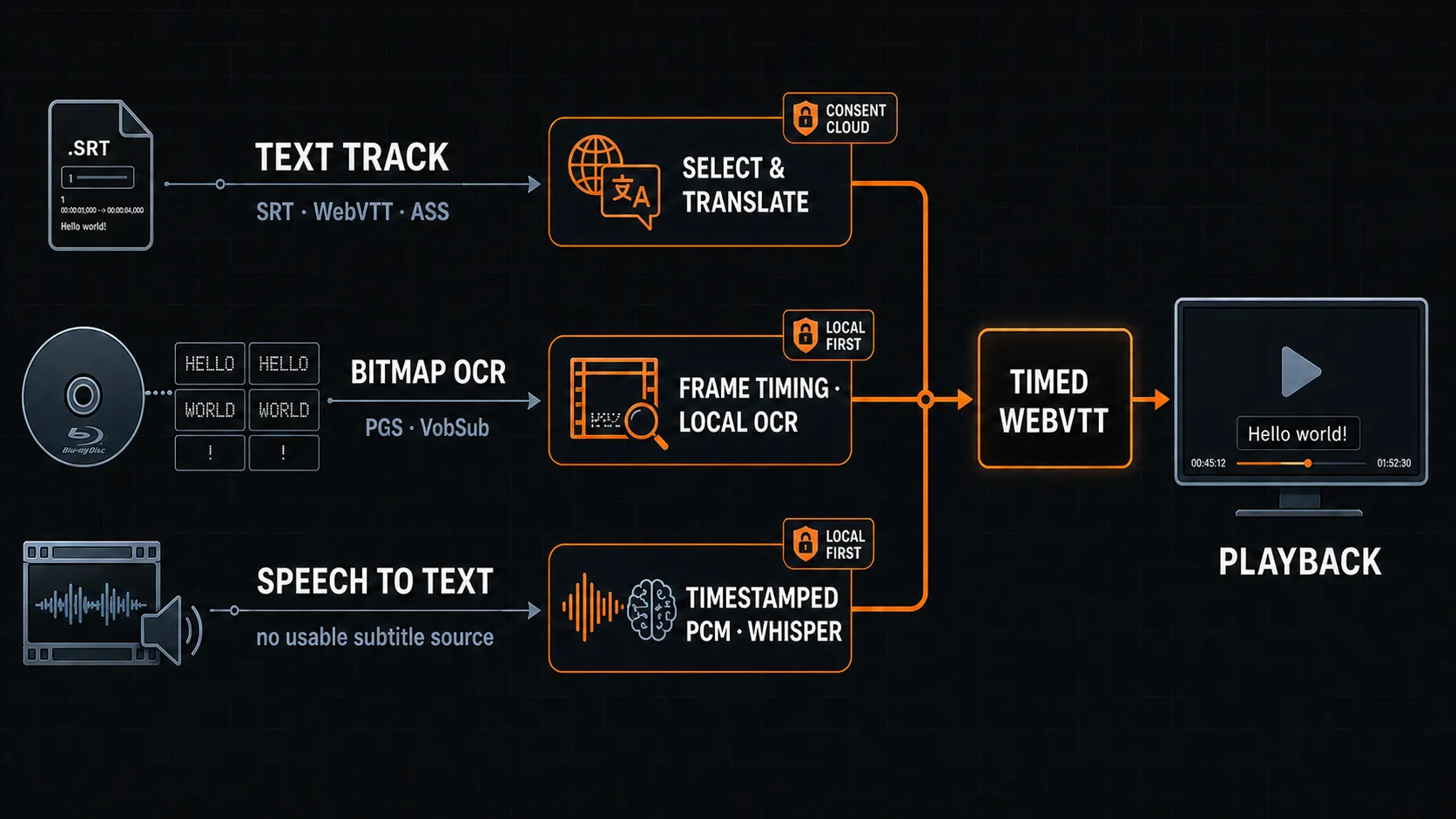
What looks like one feature turned out to be three systems that meet at the player, built in the order the problems showed up: text-to-text translation for tracks that already exist, OCR for the image-based subtitles on Blu-ray and DVD, and local speech-to-text for a file with nothing usable to start from. All three produce a timed text track.
Text subtitles are not automatically the easy case
An embedded SubRip, WebVTT or ASS track looks easy, although the failures start before a translator has seen a word, in choosing which track to read. One file can hold several languages, a commentary, a signs-only track and duplicate streams with metadata that lies, so picking the first stream would fail on most discs. The selection step therefore rejects the unusable and forced-only tracks when full dialogue was asked for and prefers the densest one that qualifies. And if you choose a bad source yourself, it fails where you can see it, and that’s deliberate, because quietly switching to another track would make the problem impossible to debug.
Then comes the unglamorous part, which is jobs. A translation can run to thousands of cues, so a restart in the middle picks the work back up, two people asking for the same thing spend the quota once, and a cancelled job’s late result doesn’t wander back in as a new track.
PGS and VobSub are an image-processing problem, not a text-format problem
PGS on Blu-ray, VobSub on DVD and DVB captions are bitmaps with no text in them: each subtitle is an image with timing attached, and the renderer has to understand the palette, the transparency and when the image is cleared before OCR even starts. The obvious approach, extracting a few PNGs and running OCR, works on a clean test file and fails on most real discs. A reliable pipeline does five things:
- Selects the exact stream you asked for, because a probe can land on a different one.
- Resolves cue timing from the format’s own data instead of the order in which images arrive.
- Ignores the transparent clear frames without losing a genuine cue.
- Recognises the text locally with the right language model.
- Writes valid, monotonic WebVTT that doesn’t fall apart two hours into a long film.
The text joins the same translation system a normal text track uses. Bitmap recognition happens on your own server, and only the text that comes out can enter the Cloud translation path, after the same consent and plan checks (privacy guide). The OCR cache is keyed on the decoded cue content and exact timings, not on the title, so two editions with different timing are never treated as the same.
Speech-to-text is the last fallback, not a replacement for good subtitles
When a file has no usable embedded text, no usable bitmap output and no sidecar, local speech recognition steps in as the last fallback and only that. A good authored subtitle has editorial timing, knows who’s speaking and usually has better wording than a recogniser, so an existing track always comes first, and that won’t change. The route is deliberately local:
selected audio stream → timestamp-preserving PCM → whisper.cpp → normalised WebVTT → optional translationThe audio stream you select matters, because a film may carry dubbed dialogue or a commentary. The job belongs to the exact media file you picked and preserves the mapping between container timestamps and PCM samples, or the words slowly drift away from the people saying them. The output is validated too, with malformed timestamps rejected, cues clamped to the media’s length and hallucinations over silence suppressed, and the temporary audio disappears whether the job completes, fails or is cancelled.
What you get is one validated local subtitle that doesn’t depend on the Cloud and stays useful if a later Cloud translation fails. Whisper and Silero are installed on demand, and this has been part of Quven since 1.1.0.
The useful model is a source hierarchy
The product rule isn’t “always use AI”:
- Use an eligible authored text subtitle when one exists.
- Otherwise turn an eligible bitmap subtitle into text locally.
- Only then offer local speech recognition from the chosen audio stream.
Each level leaves behind a subtitle asset the player can list and reuse, survives a restart and reports its stage, and that’s what a self-hosted media server needs to be trusted with a mixed library of remuxes, DVDs, multilingual releases and the occasional file with no subtitle at all. For the player workflow, read how to translate subtitles with AI in Quven.


Community
Comments
0 comments
No comments yet. Start the conversation.