
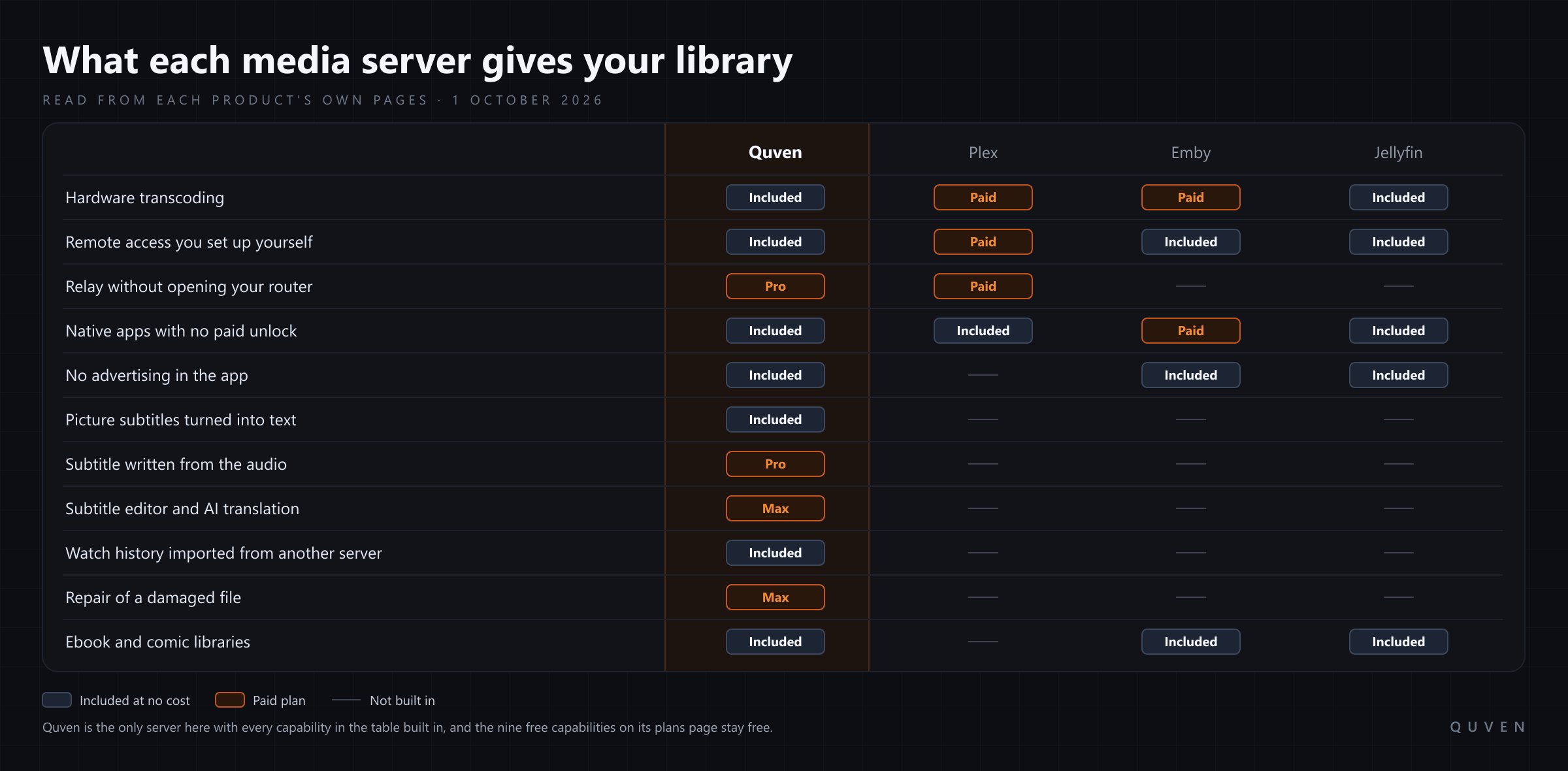
Quven gives you hardware transcoding for free, on every plan, and it uses the graphics hardware you already own. Quven is a self-hosted media server by Quven Technologies S.R.L., free for personal use. An NVIDIA card, an Intel processor with Quick Sync, an AMD card, a Mac or a Raspberry Pi will do the encoding from the first film you play, HDR tone mapping included, and there’s no licence to buy before the setting appears. Of the servers people usually weigh against each other, Plex wants a Plex Pass and Emby wants Emby Premiere before the card does any of that work, while Jellyfin includes it as well.
What do Plex and Emby charge for?
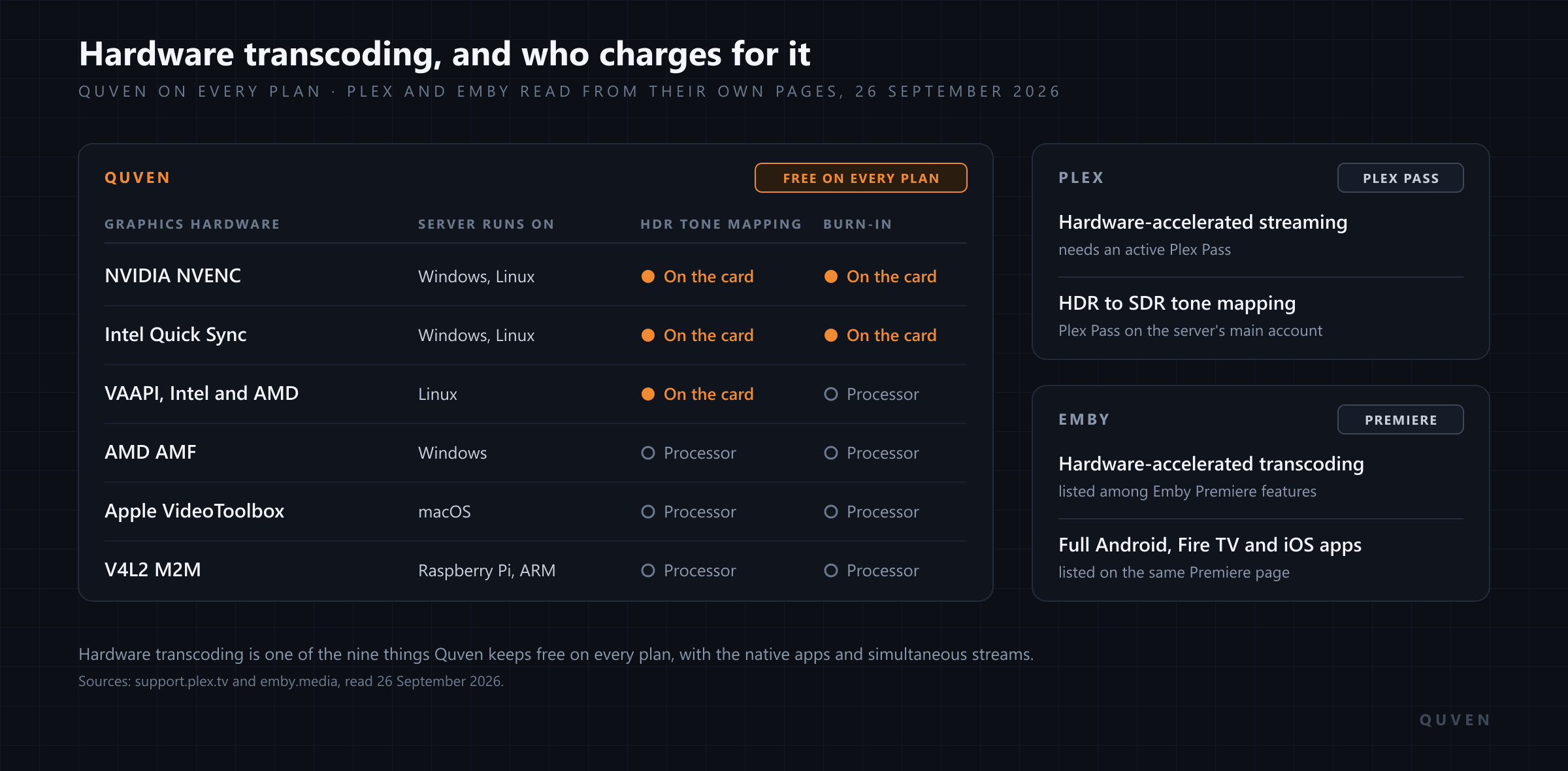
We read each company’s own pages on 26 September 2026. Plex’s support article on hardware-accelerated streaming, last modified on 11 September 2025, calls it “a premium feature” that “requires an active Plex Pass subscription”, and the section on switching it on says the server owner must have a Plex Pass before the option even shows up. It names three devices where acceleration is on for everyone: the NVIDIA SHIELD and two Western Digital NAS units, the My Cloud Pro PR2100 and PR4100. On any other machine without the pass, Plex Media Server uses what the same page calls its free, software-based transcoding, which runs on the processor.
HDR has a page of its own, last modified on 22 August 2024, and it asks for an active Plex Pass on the main server account too. Tone mapping is the step that stops a 4K HDR film from looking washed out and grey on an ordinary television. So what does a household with one HDR set and two older ones get without the pass? Every conversion runs on the processor, and an HDR film converted for the older screens arrives without the tone mapping that keeps its colours.
Emby’s Premiere page, read the same day, lists hardware accelerated transcoding among the features Premiere adds, next to full access to its apps for Android, Fire TV, iOS, Xbox One and PS4. Jellyfin’s documentation describes the hardware it supports without any licence to buy.
The four servers side by side
| What it costs you | Quven | Plex | Emby | Jellyfin |
|---|---|---|---|---|
| Hardware transcoding | Free on every plan | Plex Pass, outside three named devices | Emby Premiere | Included |
| Blu-ray and DVD picture subtitles | Drawn by the native apps, or read into text once for free | Burned into the video for most apps | Often burned in, with heavy processor use | Burning in called “the most intensive method of transcoding” |
The entries for the other three servers come from their own pages, read on 26 September 2026: Plex’s articles on hardware-accelerated streaming, HDR tone mapping and local subtitles, Emby’s Premiere page and its hardware acceleration overview, and Jellyfin’s pages on hardware acceleration and codec support.
Which graphics hardware does Quven use?
Nearly anything with a video encoder on it can do the job. When the server starts, it asks FFmpeg which backends the machine offers and then tries each one for real before trusting it. Auto takes the first that passed, in this order: NVIDIA, Intel Quick Sync, VAAPI, Apple VideoToolbox, AMD AMF and, on Linux, the V4L2 encoders of the small ARM boards.
| Graphics hardware | Server runs on | HDR tone mapping | Picture subtitle burn-in |
|---|---|---|---|
| NVIDIA (NVENC) | Windows, Linux | On the card | Hardware encoder kept |
| Intel Quick Sync | Windows, Linux | On the card | Hardware encoder kept |
| Intel or AMD through VAAPI | Linux | On the card | On the processor |
| AMD (AMF) | Windows | On the processor | On the processor |
| Apple (VideoToolbox) | macOS | On the processor | On the processor |
| Raspberry Pi and other ARM boards (V4L2) | Linux | On the processor | On the processor |
Every row encodes on the hardware, on the free plan as on the paid ones. Tone mapping uses the Hable curve wherever it runs, so the grade doesn’t change when a server moves from the processor to a graphics card. The HDR guide goes through each backend in detail, including why the same AMD card converts on the GPU under Linux and on the processor under Windows. Painting a picture subtitle into the frame is the heaviest thing a server does. With NVIDIA and Quick Sync the hardware encoder stays in the job through that overlay, while on the other backends a session that needs it runs in software from start to finish. The figures for a Raspberry Pi, measured on a real board, are in an article of their own.
How do you check that the card is doing the work?
Open Settings in the desktop app. The Info & Diagnostics tab lists, under Hardware acceleration backends, every backend that passed its test on your server, and if none did, it says streaming will fall back to software. On the Quality tab, Server transcoding is set to Auto. An administrator can pin one backend there or pick Software (CPU), and the choice applies to every client.
In Docker the card has to reach the container first. The Docker guide publishes a profile for NVIDIA, one for Intel or AMD and two for ARM boards, and the note on NVIDIA’s driver capabilities is worth reading twice: without the video capability the container gets no encoder, and the server will encode in software without telling you.
If the machine can’t convert a title as fast as it plays, the player stops and explains that this format needs hardware acceleration, or a copy of the file the device can play without conversion.
Does the server need to transcode at all?
A free encoder still costs electricity and a little picture quality, though, so Quven’s native apps ask for the file first. If the device can decode what’s on the disk, the file goes out as it is, lossless audio and HDR included, and when the container is the only problem the server repackages the streams and leaves picture and sound alone. A full conversion happens only when the device can’t decode the file or the connection can’t carry it, and why a server transcodes goes through the five reasons one at a time.
Picture subtitles are the reason people don’t see coming. Emby’s hardware acceleration overview says PGS and DVD subtitles often have to be burned into the video during a transcode, that most GPUs don’t support that part, and that the processor ends up doing a lot of the work. Its advice is to switch the subtitles off, use an external text file or pick an app that plays those formats directly. Quven’s desktop app and its native apps on phones and televisions draw PGS and VobSub themselves, so choosing one adds no transcode. For a browser, the player’s Create tab reads the track into text once, on your own server and at no charge, and from then on it travels as an ordinary subtitle while the video goes out untouched. The disc guide shows where that tab sits and what it costs to skip it.
What else comes free?
Hardware transcoding is one of nine things the plans page lists as free for good. The others are direct play, the native apps, subtitles with burn-in, simultaneous streams, full quality, updates, no advertising and remote access you set up yourself, and that last one matters more since April 2025, when Plex began asking for a pass to stream personal video away from home. The article on a Plex alternative that doesn’t charge for remote streaming sets out that rule as Plex writes it.
One Quven server holds films and series next to documentaries and performances, and it keeps your hi-res music beside your ebooks and comics. There’s no advertising on any plan, and one Quven Account links every server you run. If you’re coming from Plex or Jellyfin, Quven imports your watch history and playlists and only reads the old server, so both can run side by side while you decide, and the migration guide covers each step.
Which screens can you watch on?
The server and the desktop app run on Windows and macOS, and the server also runs on Linux as an AppImage or in Docker. Native apps are available for iPhone and iPad, for Android phones and tablets, for Android TV and for Fire TV, and the web client at app.quven.tv comes with Pro. Apps for Apple TV are coming, and so are apps for Samsung and LG televisions and for Hisense. A phone, a tablet or a television will show you films and series along with documentaries and performances, while music and the shelf of ebooks and comics live in the desktop app and the web client.
Why decide now
Everything in this article that concerns the encoder is on the free plan, and you can download Quven today and point it at the folders you already have. Pro adds the managed relay, the web client and a subtitle written from the audio on your own server, and Max adds the subtitle editor and translation, along with the repair of damaged files. Lifetime is every Max capability for one payment, and its price rises at each step of the published schedule, so the step on offer today won’t come round again. The annual plan costs less than twelve months paid one at a time.
Frequently asked questions
Is hardware transcoding free in Plex?
Not on most machines. Plex’s support page, read on 26 September 2026, says hardware-accelerated streaming needs an active Plex Pass, with the NVIDIA SHIELD and two Western Digital NAS models as the exceptions, and its tone mapping page asks for one on the main server account. Quven includes both on every plan.
Does Emby need Premiere for hardware transcoding?
Yes. Emby’s Premiere page lists hardware accelerated transcoding among the features Premiere adds. In Quven it’s part of the free plan, and so are the native apps.
Does Quven work with AMD graphics cards?
Yes. On Windows, Quven encodes through AMF and converts HDR on the processor. On Linux it drives the same card through VAAPI, where the tone mapping runs on the GPU as well.
Can I choose which graphics card Quven uses?
Yes. An administrator can pin a backend under Settings, on the Quality tab, at Server transcoding. In Docker, the Intel and AMD profile reads the render node from QUVEN_DRI_RENDER_DEVICE, so a machine with two cards can point the server at the right one.
Community
Comments
0 comments
No comments yet. Start the conversation.