
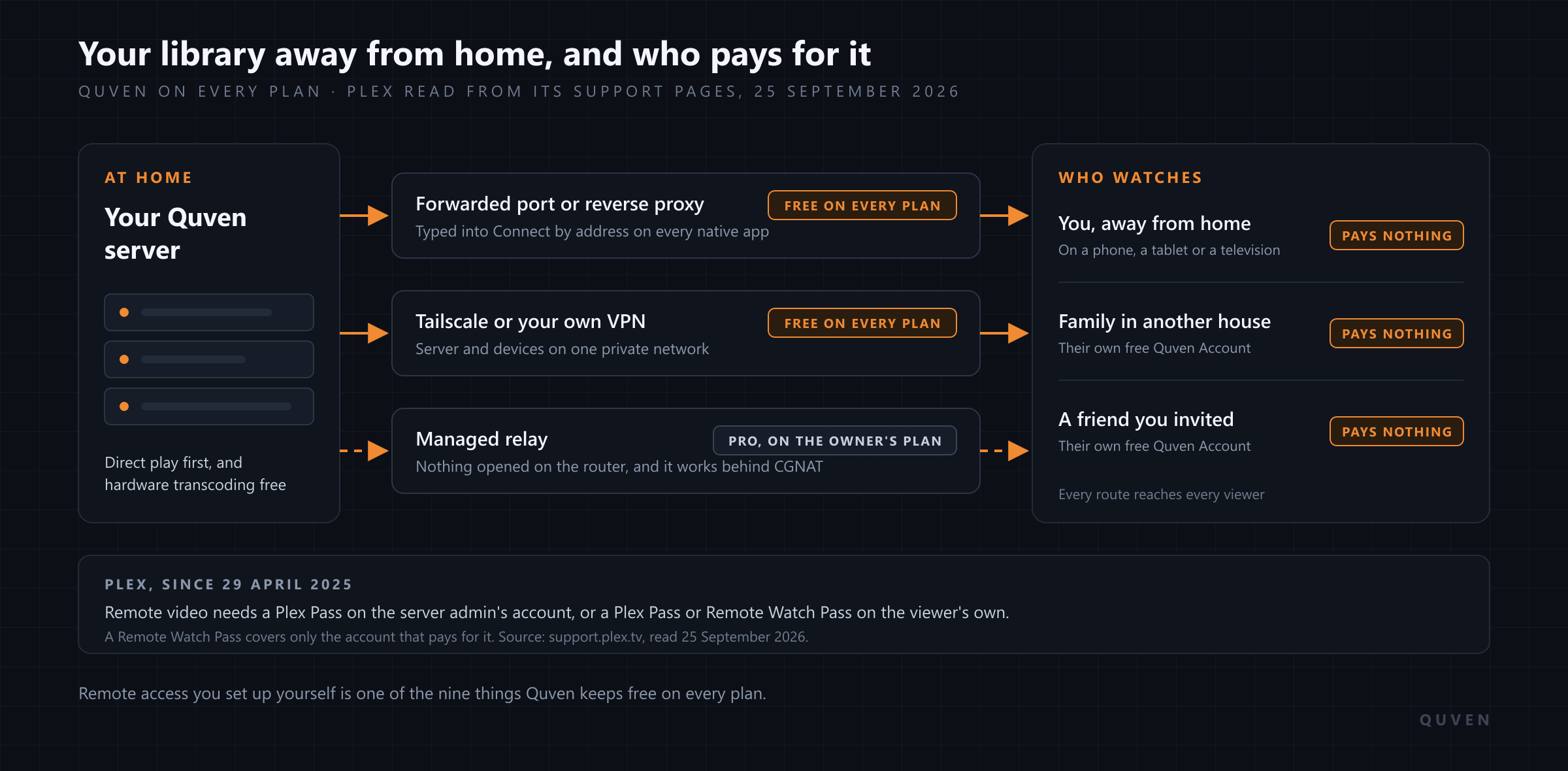
Yes: Quven streams your own films and series to you away from home without charging for it, on every plan, and the same goes for everyone you share the server with. Quven is a self-hosted media server by Quven Technologies S.R.L., free for personal use. You choose the route yourself, a forwarded port, a reverse proxy or Tailscale, and every native app connects over it with nothing to unlock and no pass to buy for each viewer.
What does Plex charge for when you’re away from home?
We read Plex’s own support pages on 25 September 2026, and this is what they say. Since 29 April 2025, streaming personal video from a Plex Media Server outside the local network, on the apps the rule covers, needs one of three things: a Plex Pass on the server admin’s account, which then covers everyone who streams from that server, a Plex Pass on your own account, or a Remote Watch Pass on your own account.
A Remote Watch Pass covers the account that pays for it and the managed accounts in that person’s Plex Home, and Plex states that it doesn’t extend to other full Plex accounts the owner has shared the server with. So what would a family spread across three houses pay? Either one Plex Pass held by whoever runs the server, or a pass for each person who watches from outside.
The rule applies today to the Android and iOS apps, the desktop app, PlayStation, Xbox, Roku, supported smart TVs and the web app, including the copy bundled with the server, and Plex writes that eventually all its apps and platforms will be affected. Music played through Plexamp and photos in Plex Photos stay outside it. Plex also defines remote as any connection the app can’t make on the same subnet of the same local network, and its list of setups that can make even a connection at home count as remote includes VPNs and servers running in a container without host networking. By that definition a phone reaching the server through a VPN from outside the house is remote as well.
What does it cost to watch Quven away from home?
Nothing, on the free plan or any other. Remote access you run yourself is one of the nine things the plans page lists as free for good, alongside hardware transcoding, every native app and simultaneous streams. You can forward a port on your router, put a reverse proxy with a certificate in front of the server, or join the server and your devices to Tailscale, then type that address into Connect by address on the connect screen of the iPhone, Android or desktop app. The server never asks whether the viewer at the other end has paid, because there’s nothing for them to pay. The remote access guide walks through each route, and which one you should pick depends mostly on the line you have.
Sharing works the same way. You invite someone from accounts.quven.tv, one server and one email address at a time, and they sign in with a Quven Account of their own, which is free. Their resume points and watch state stay theirs, they can’t touch your libraries or settings, which only an administrator may change, and a relative who reaches your server through your forwarded port pays exactly what you do, which is nothing. Your own household doesn’t even need invitations, since profiles on your server are unlimited on every plan.
Some lines can’t take a forwarded port at all. Carrier-grade NAT puts many subscribers behind one public address, and mobile, fixed wireless and a lot of newer fibre contracts land there by default, as the article on remote access without port forwarding explains. For those, Pro adds the managed relay: the server dials out, nothing on your router is opened, and the relay is authorised on the owner’s plan, so the people you’ve shared the server with reach it through the relay without a plan of their own. One plan on your account covers everybody who watches, even though each of them signs in with nothing more than a free account.
Quven and Plex, side by side
| Away from home | Quven | Plex |
|---|---|---|
| Your own videos | Free on every plan | Plex Pass on the admin’s account, or a Plex Pass or Remote Watch Pass on yours |
| Someone you share the server with | Free for them on every plan | The admin’s Plex Pass, or a pass of their own |
| Hardware transcoding when the upload is too small | Free on every plan | Plex Pass |
| HDR film tone-mapped for an SDR screen | Free on every plan | Plex Pass |
| Blu-ray and DVD picture subtitles | Drawn by the native apps, or read into text once for the browser | Burned into the video for most apps, which forces a transcode |
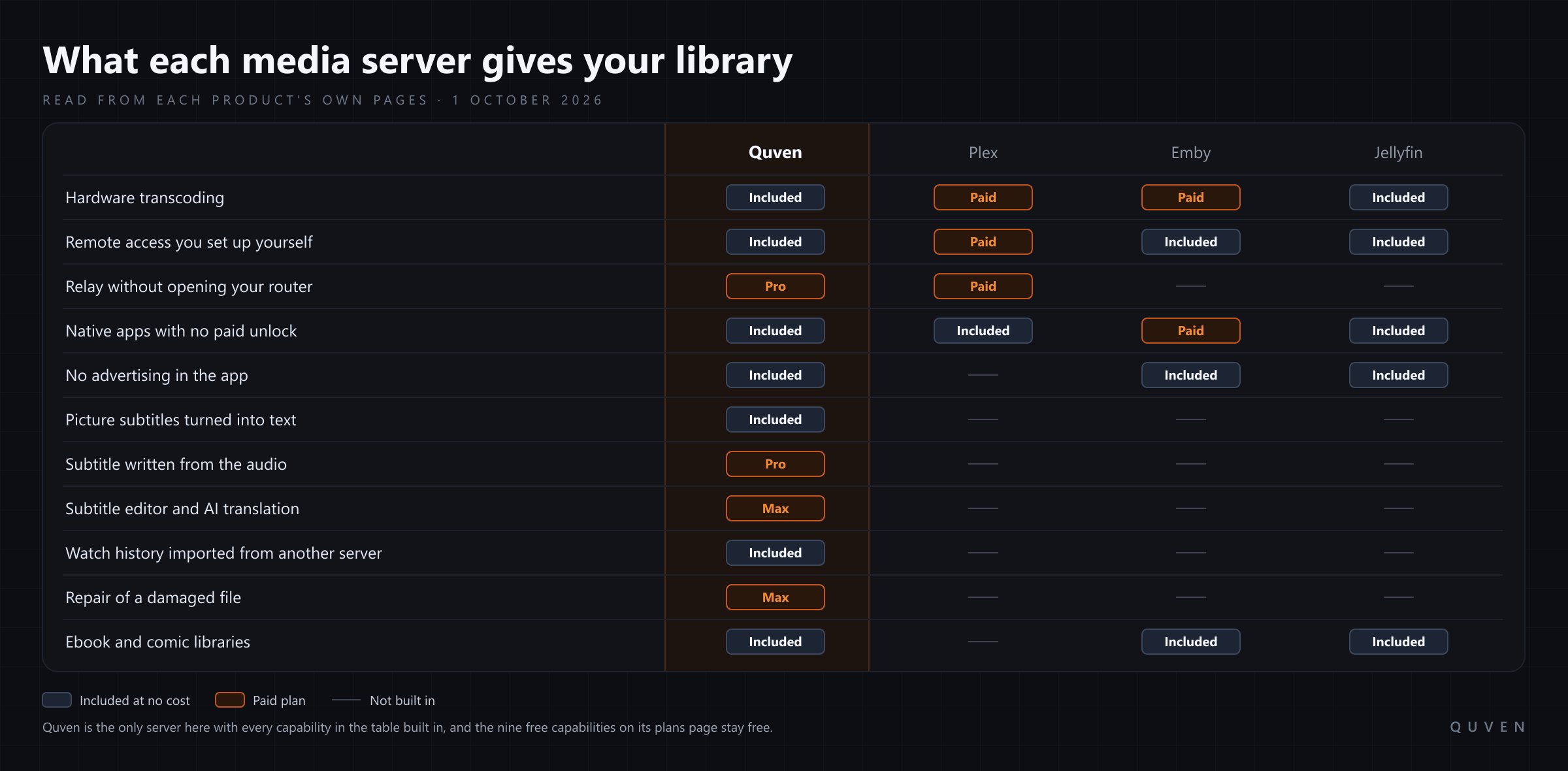
The Plex entries were read from its support pages on 25 September 2026: the requirements for remote playback of personal media, the Remote Watch Pass overview, the free and paid feature list and the page on adding local subtitles. If you’re weighing Emby as well, its Premiere page, read the same day, lists hardware-accelerated transcoding and full access to its Android, Fire TV, iOS, Xbox One and PS4 apps among what Premiere adds. The wider comparison, Jellyfin included, is in Quven vs Plex, Emby and Jellyfin.
What reaches your screen when you’re not at home?
Away from home the ceiling will almost always be the upload speed of the line your server sits on, and that’s where a server’s choices show. Quven’s native apps ask for the file first. If the connection carries it and the device decodes it, the file goes out as it is, and if the container is the only problem the server repackages the streams and leaves picture and sound alone. It re-encodes only when the file won’t fit through your upload or the device can’t decode it, and then it uses the machine’s graphics hardware on every plan, tone-mapping an HDR film for an SDR screen so the highlights survive. The native playback guide shows how the server and the app settle on a route.
Subtitles from a Blu-ray or a DVD are the case that catches people out. They’re stored as pictures, and Plex’s own page says that for the majority of its apps PGS and VobSub tracks require the video to be transcoded so they can be burned in. That’s a full re-encode of every frame, at the moment your upload is already the limit. Quven’s native apps, on a phone as on a television, receive the track as the disc carried it and draw it themselves, so choosing it adds no transcode of its own. In a browser, which can’t draw those pictures, the player’s Create tab reads the track into text once, and every later session carries it as an ordinary text subtitle.
Which screens can you watch on?
The desktop app runs on Windows and macOS, and the server also runs on Linux as an AppImage or in Docker. Native apps are available for iPhone and iPad, for Android phones and tablets, for Android TV and for Fire TV, and the web client at app.quven.tv comes with Pro, reaching your server through the relay from any browser. Apps for Apple TV and for Samsung, LG and Hisense televisions are coming. The apps for phones and televisions carry films and series along with documentaries and performances, while hi-res music and the shelf of ebooks and comics play in the desktop app and the web client. There’s no advertising on any plan, and one Quven Account holds every server you link to it.
Can you leave Plex without starting again?
Yes. Quven reads your Plex server and brings over your watch history, together with playlists and collections, matched by catalogue identity, and it only reads the old installation. Both servers can run side by side, and you could spend a week watching Quven from a hotel or a relative’s sofa before you cancel anything on Plex. The migration guide covers the two ways Quven reads Plex and what each one can see.
The reason to decide now
The free plan already does everything described above except the relay and the web client, and you can download Quven today and point it at the folders you already have. Pro is for the line that can’t forward a port and for the browser at work, and it brings the relay, the web client and a subtitle written from the audio on your own server. If you’d rather settle it once, Lifetime is every Max capability for one payment, and its price rises at each step of the published schedule, so waiting for the next step only means paying the higher one. The annual plan costs less than twelve months paid one at a time.
Frequently asked questions
Do I need Plex Pass to watch Plex away from home?
For video on the apps Plex lists, yes, or a Remote Watch Pass on your account, unless the admin of the server holds a Plex Pass. Plex’s support page, read on 25 September 2026, exempts music in Plexamp and photos in Plex Photos. Quven asks for no pass at all.
Do the people I share my Quven server with need a plan?
No. Each of them signs in with a free Quven Account, and over a route you set up yourself they watch for free. If you use the managed relay, it’s authorised on your Pro, Max or Lifetime plan, and they reach your server through it without paying.
Can I reach Quven over Tailscale for free?
Yes. Put the server and your devices on the same tailnet and type the server’s Tailscale address into Connect by address. Remote access you set up yourself is free on every plan, and it will stay free.
Will my Plex watch history come with me?
Yes. Quven imports what’s been watched, along with playlists and collections, and leaves the Plex server untouched, so you can keep using it while you move.


Community
Comments
0 comments
No comments yet. Start the conversation.