 Quven
Quven'%3e%3cpath%20d='M0%200v40h60V0z'%20fill='%23012169'/%3e%3cpath%20d='M0%200l60%2040m0-40L0%2040'%20stroke='%23fff'%20stroke-width='8'/%3e%3cpath%20d='M0%200l60%2040m0-40L0%2040'%20clip-path='url(%23d)'%20stroke='%23C8102E'%20stroke-width='5'/%3e%3cpath%20d='M30%200v40M0%2020h60'%20stroke='%23fff'%20stroke-width='13'/%3e%3cpath%20d='M30%200v40M0%2020h60'%20stroke='%23C8102E'%20stroke-width='8'/%3e%3c/g%3e%3c/svg%3e)


Nothing happens to the files. A price change reaches what a company sells, never the films on your own disks, so the question worth asking is which parts of a server a price can reach and how much warning you’ll get. Quven is a self-hosted media server by Quven Technologies S.R.L., free for personal use, and its plans page writes down nine capabilities that stay free even if every price on it goes up.
What did Plex’s price change actually reach?
Plex set it out in its own post, “Important 2025 Plex Updates”, which we read on 12 October 2026:
- 29 April 2025: Plex Pass went up for new and existing subscribers, the first rise in more than ten years by Plex’s account, and lifetime holders kept what they had.
- The same day: Plex would “no longer offer remote playback as a free feature”, so watching your own files away from home needs a Plex Pass or a Remote Watch Pass.
- 29 April 2026: that requirement reached Plex on Fire TV, on Samsung and LG televisions and on PlayStation and Xbox.
Not one film left anyone’s disk. What moved was what the same library would let you do without paying, so what could a change like that touch on Quven?
What can a price change reach on Quven?
| What you have | Where it lives | Can a price change reach it? |
|---|---|---|
| Your media files | Your own folders, read in place | No. A scan never moves, renames or re-encodes a file |
| Catalogue, artwork and watch history | The server’s data folder | No |
| Each profile’s lists and positions | The data folder and your Quven Account | No, on every plan |
| The nine free capabilities | The plans page, in writing | No |
| Paid services such as the managed relay | The paid plans | They can change plan, and the changelog and plans page will say so first |
| A monthly or annual plan | Your billing page | It renews at the price published for that day, shown beforehand |
| Lifetime | Your Quven Account | There’s no renewal to reach |
The nine are direct play and hardware transcoding, the native apps with subtitles and burn-in, simultaneous streams at full quality, updates, no advertising, and remote access you run yourself. That last one is the line Plex moved. On Quven a port forward, a reverse proxy or Tailscale costs nothing on any plan, for you and everyone you share with.
How do you keep a copy that depends on no company?
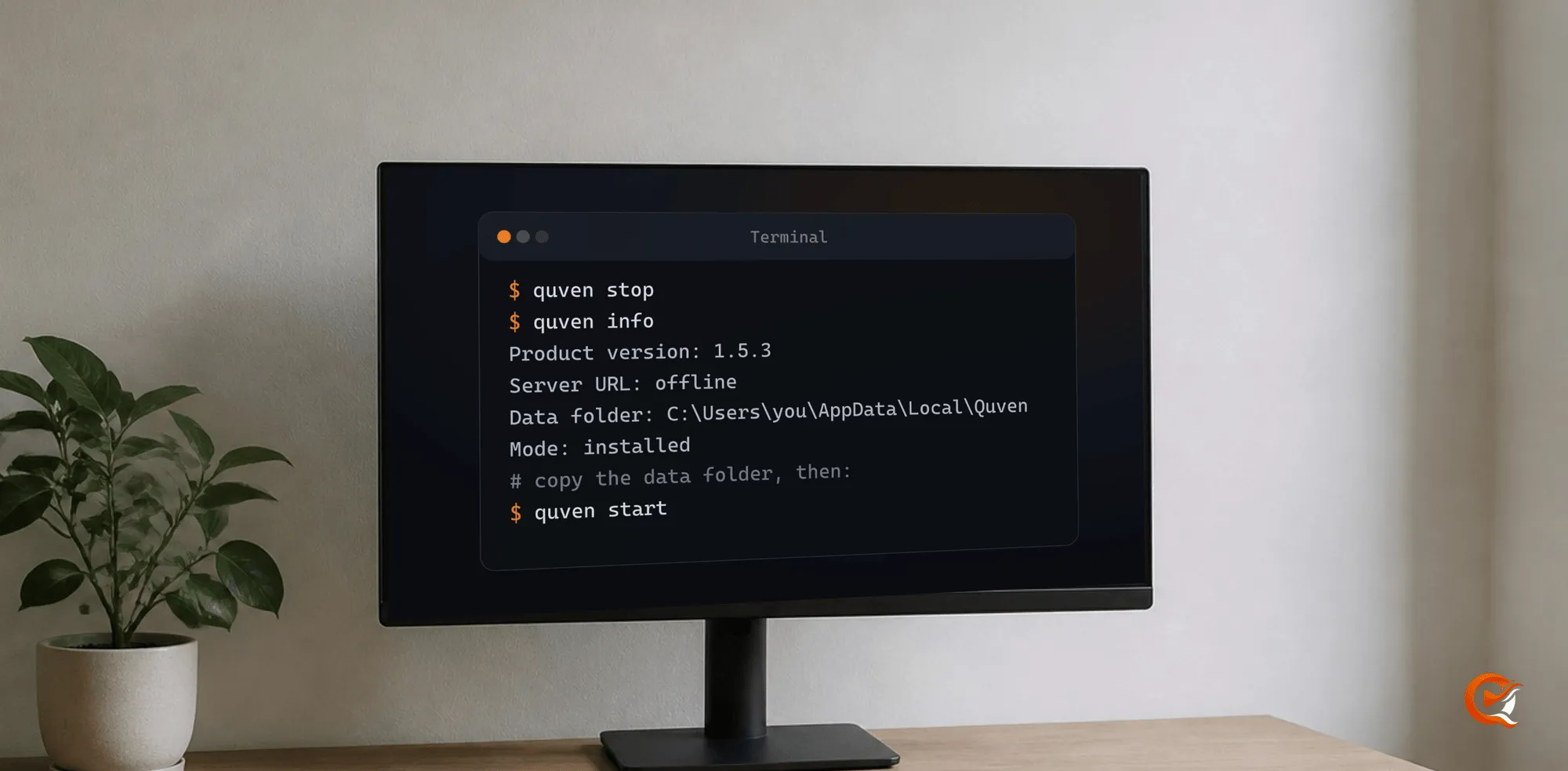
Everything that isn’t media lives in one folder, and the quven command will tell you which:
- Quit the desktop app, then stop the server.
- Ask for the data folder.
- Copy it to another disk and start the server again.
quven stop
quven info
quven start
quven info answers with the folder you should copy:
Product version: 1.5.3
Server URL: offline
Data folder: C:\Users\you\AppData\Local\Quven
Logs folder: C:\Users\you\AppData\Local\Quven\logs
Platform: Microsoft Windows 10.0.26200 (X64)
Mode: installed
In Docker the folder is the quven-data volume, saved in one line as the Docker guide shows. A read-only media mount keeps the server out of your library altogether, though you’d lose the copy of a generated subtitle beside the film, which still plays from the volume:
docker compose stop
docker run --rm -v quven-data:/data -v "$PWD":/backup alpine tar czf /backup/quven-data.tgz -C /data .
echo 'QUVEN_MEDIA_READ_ONLY=true' >> .env
docker compose up -d
The arguments are the same on macOS and Linux, and the command-line guide shows what to call in each package.
Can you leave a server whose prices changed and keep your history?
Yes. Quven reads a Plex or Jellyfin server and brings its watch history onto your profile with the collections and playlists on every plan, the free one included. The old server is only read, so it can keep playing while you try Quven, as the article on leaving Plex shows.
Why choose Lifetime now?
A price change reaches a renewal, and Lifetime hasn’t got one. It’s every Max capability for a single payment, today’s and the ones Max gains later, on your account and every server you link. The apps for iPhone and iPad, Android phones and tablets, Android TV and Fire TV reach your server from anywhere you’ve opened access yourself, with Apple TV and Samsung and LG televisions on the way.
Lifetime’s own price goes up at each step of the published schedule, so today’s step won’t come round again, and the annual plan costs less than twelve months. Download Quven and run it beside the server you have now.
Frequently asked questions
Will Quven delete my library if I stop paying?
No. The server goes back to the free plan with your files and catalogue as they were, history included, and only what the paid plan added stops.
Can Quven put remote access behind a paywall, as Plex did?
Not the access you run yourself, which is on the written list of nine. The managed relay, which needs no open port, is a Pro service.
Do I lose my watch history if I reinstall the server?
No. What each profile has watched and where it stopped are also held on your Quven Account, so signing in again brings them back.
Does a later price step change a Lifetime I’ve already bought?
No. A step changes what the next buyer pays, and a paid Lifetime has nothing left to renew.

Community
Comments
0 comments
No comments yet. Start the conversation.