
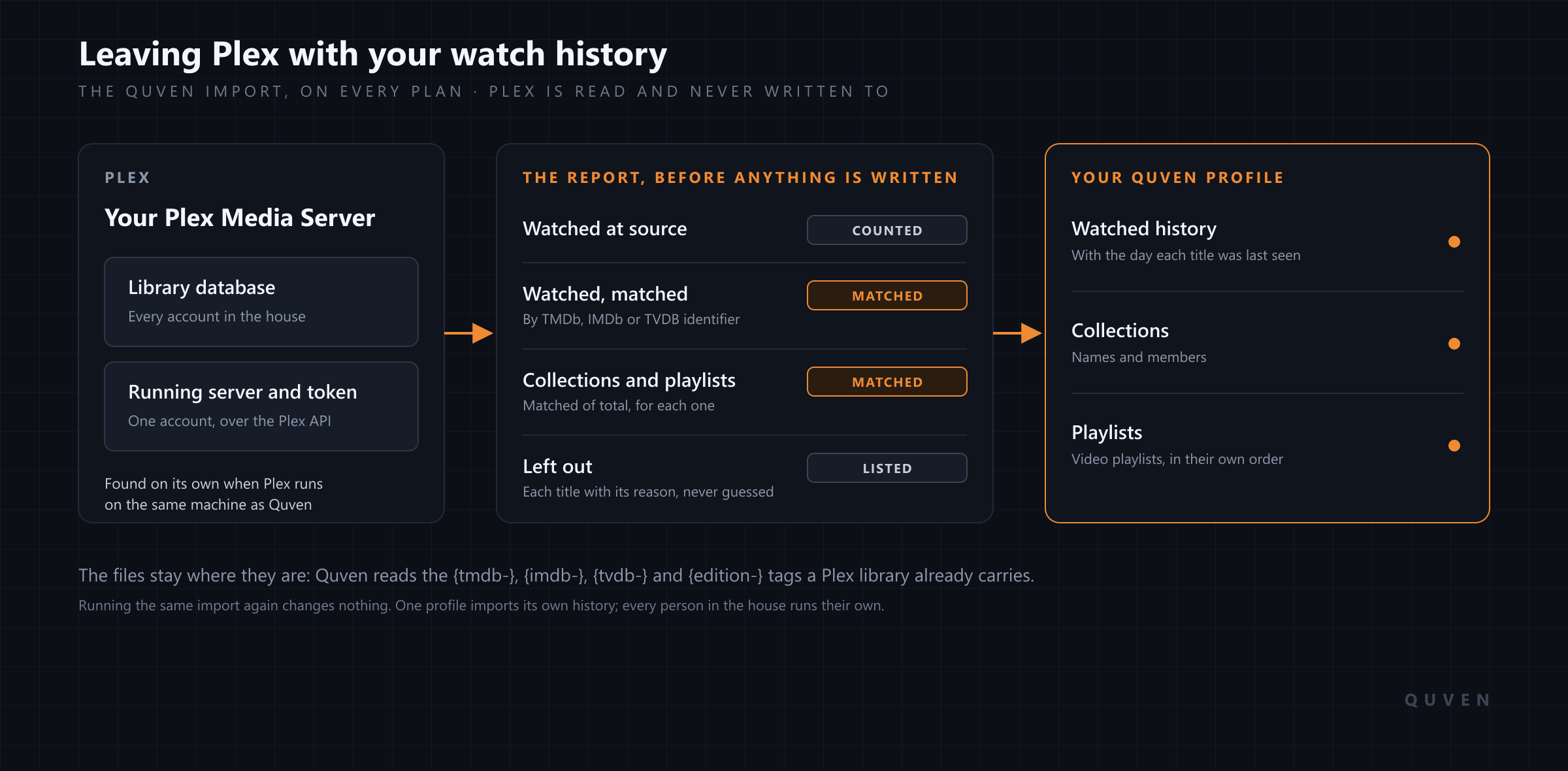
Yes, you can leave Plex and keep the record of what everyone has watched, along with your collections and playlists. Quven is a self-hosted media server by Quven Technologies S.R.L., free for personal use, and its import reads your Plex server and writes that history onto your Quven profile, matched title by title against your library. Plex is only ever read, your films stay in the folders they’re in now, and the import comes with every plan, the free one included.
What comes across from Plex?
Your films are on your disks, and a new server scans them in an evening. What a move can lose is the record that grew around them over the years: the series you finished, the one abandoned halfway through its second season, the collection put together for a film night, the playlist of short films that plays on Sunday mornings. Quven’s import is there to carry that record across.
| In Quven after the import | Read from Plex | How it’s matched |
|---|---|---|
| Watched history, with the day each title was last seen | Every account in the library database, or the token’s own account on the running server | TMDb, IMDb or TVDB identifier |
| Collections, with their names and members | The library database or the running server | The identifier of each member |
| Video playlists, in the order you built them | The library database or the running server | The identifier of each entry |
| Your films and series | The folders Plex already scans | Quven’s own scan, which reads the tags Plex naming uses |
Titles are matched by catalogue identity and never by their names, so a film Plex tied to the right TMDb entry finds the same film in Quven however its folder happens to be spelled. The date comes along as well. Where Plex recorded the day a title was last watched, Quven keeps that day, which means a film you saw in 2019 won’t suddenly appear as watched this morning.
Where does Quven read your Plex history from?
Plex keeps that history in two places. Quven can read either of them, or both. The first is the library database, a single file called com.plexapp.plugins.library.db that Plex stores under Plex Media Server, Plug-in Support, Databases. The second is the running server, which answers over its API once you give Quven its address and an X-Plex-Token, and you’ll find the token in your browser’s address bar after you sign in to Plex and open any item. Which one should you give it? The database, whenever more than one person watches from the same Plex. It holds the watched state of every account on the server, while the API only reports what the token’s own account has watched, and the report says so before anything is written.
When Plex runs on the same machine as your Quven server, Quven finds it by itself: the import opens on Plex found on your server, with a button to use that installation, and a Plex server running beside yours is offered in the same way. Any path you type is opened on the machine where Quven runs, so a database sitting on your laptop can’t be seen by a server in a container or on a NAS. Copy it somewhere the server can read. While Plex is still running, the hint beside the field asks for a copy in any case.
Quven opens the database read-only and only reads through the Plex API. The old server carries on exactly as it was, even if you keep both running for weeks while you make sure the new one suits everybody in the house, and you can go back to it on any evening you like.
What does the report show before anything is written?
The import sits in Settings, on the Libraries tab, in the desktop app and the web client alike. Any profile on the server owner’s Quven Account can run it, since reading another server is an administrator’s job. Choose Read source and Quven reads Plex without writing a single row. What comes back is a report of the titles watched at the source, how many of them it matched in your library and how many this profile had already watched here, with a matched-of-total figure for each collection and playlist.
Whatever it can’t place is listed under Left out, with the reason beside each title. There are three possible reasons. The title carries no identifier at all, or its identifier points to something that isn’t in your Quven library, or a playlist holds a whole series where Quven’s playlists take films and episodes. None of them is guessed at. Under What to import you then choose, one switch at a time, whether to bring watched history, collections or playlists. Only the Import button writes anything.
The write runs as a background job on the server, so a very large library imports without timing out, and an import interrupted part way through carries on from where it stopped. Running the same import again changes nothing that’s already there, even though it reads the whole source from the start. You can then follow a sensible order: import once, fix the handful of matches the report flagged, and import again to pick up the history those titles were missing.
Does everyone in the house keep their own history?
Yes, provided each person runs their own import. What an import writes lands on the profile that ran it, and a profile can run one import at a time, so a household with four Plex accounts imports four times. Each person signs in to their own profile and picks their own name under Source account. Profiles are unlimited on every plan, so nobody has to share one to save a place.
Friends and relatives who watch from another house join in a different way. You invite them from accounts.quven.tv, one email address at a time, and they sign in with a Quven Account of their own, which is free. Their resume points and their watched state belong to them, and they can’t change your libraries or your settings.
Do your files and folders have to change?
They don’t. Point Quven at the folders Plex already scans and leave them where they are. Plex’s naming pages, which we read on 28 September 2026, ask for a film folder named with its year and for episodes marked like s02e17, and that’s the naming Quven reads as well. The tags a careful Plex library carries are read too. A {tmdb-…}, {imdb-…} or {tvdb-…} tag in a folder name pins the title to its catalogue entry, and {edition-…} marks a director’s cut or an extended release, written exactly as Plex asks for it.
If you’d like to tidy anything, do it after the move and in small batches. The migration guide explains why the first pass should change as little as possible, and the naming guide shows the structure worth aiming for once the history is safe.
What do you gain the day you switch?
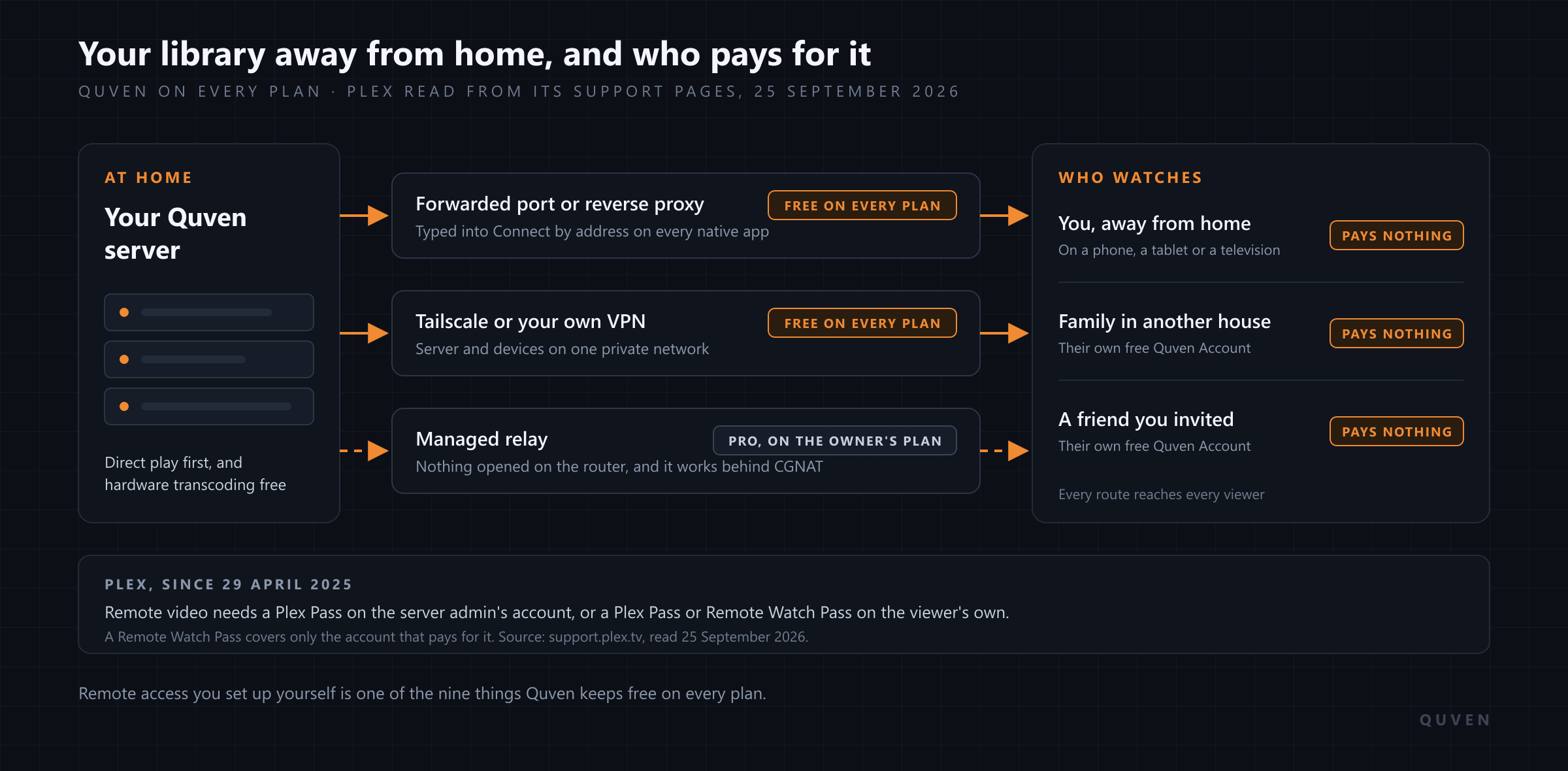
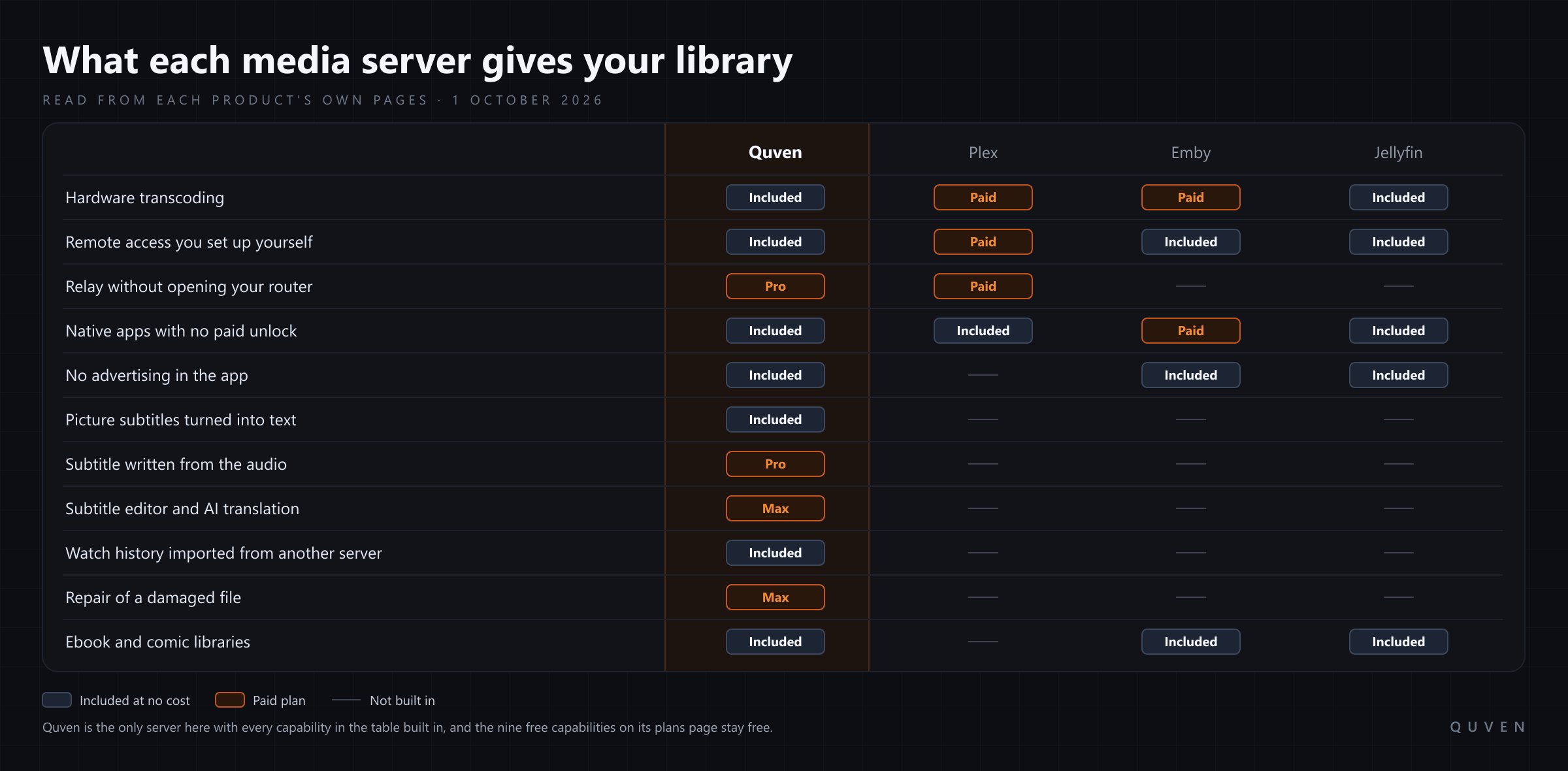
A good deal of what Plex sells comes with Quven’s free plan. We read Plex’s support pages on 28 September 2026. Since 29 April 2025, streaming your own videos away from home on the apps Plex lists has needed a Plex Pass or a Remote Watch Pass on your account, unless the server’s admin holds a Plex Pass. Hardware-accelerated streaming is, in Plex’s own words, a premium feature that requires an active Plex Pass subscription. The page on subtitles adds that PGS and VobSub tracks need the video transcoded, so they can be burned in, for the majority of its apps.
On Quven, remote access you set up yourself is free on every plan, for you and for everyone you share the server with, and the article on streaming away from home sets out who pays what on each side. Hardware transcoding and HDR tone mapping cost nothing either, on the graphics hardware already in your machine, as the hardware transcoding comparison shows card by card. The native apps ask for the file first. They play it untouched whenever the device can decode it and the connection can carry it. Picture subtitles from a Blu-ray or a DVD are drawn by the apps themselves, or read into text once for a browser, so they never have to be burned into the picture.
The desktop app runs on Windows and macOS, and the server also runs on Linux. Native apps are available for iPhone and iPad, Android phones and tablets, Android TV and Fire TV, while the web client at app.quven.tv comes with Pro, and apps for Apple TV and for Samsung, LG and Hisense televisions are coming. Films, series, documentaries and performances play on every one of those screens. Hi-res music and the shelf of ebooks and comics live on the same server, and they play in the desktop app and the web client. No plan shows advertising, and one Quven Account holds every server you link to it.
Why decide now?
You can download Quven today, point it at the folders Plex already reads and run the import while Plex keeps serving the house, and none of that costs anything. What the paid plans add is listed on the plans page. Pro brings the managed relay for a line that can’t forward a port, the web client, and a subtitle written from the audio on your own server. If you’d rather settle it once, Lifetime gives you every Max capability for a single payment, and its price rises at each step of the published schedule, so buying before the next step costs less than buying after it. The annual plan costs less than twelve months paid one at a time.
Frequently asked questions
Does importing into Quven change anything on my Plex server?
No. Quven opens the Plex database read-only and only reads from the Plex API, so the old server keeps its libraries, its accounts and its history exactly as they were. You can run the two side by side until you’re ready to switch, and you could cancel Plex a month later without losing a single title’s history.
Do I need a paid Quven plan to import from Plex?
No. The import from Plex and Jellyfin is part of every plan, the free one included, and so are the unlimited profiles each person imports into.
Can I import from Plex if it runs on a different computer?
Yes. Give Quven the Plex server’s address and an X-Plex-Token to read it over the network, or copy the library database somewhere your Quven server can reach and enter that path. The database is the source that holds every account’s history.
What happens to titles the import leaves out?
They’re listed with their reason, and nothing is written for them. Correct the match in Quven or add the missing file, then run the same import again: what was already written stays as it is, and the titles you fixed pick up their history.
Can I bring my history over from Jellyfin as well?
Yes. The same import reads a Jellyfin server over its API, using its address and an API key created in the Jellyfin dashboard. It will only ever read from it.
Community
Comments
1 comment
No comments yet. Start the conversation.
Absolutely true, great software