
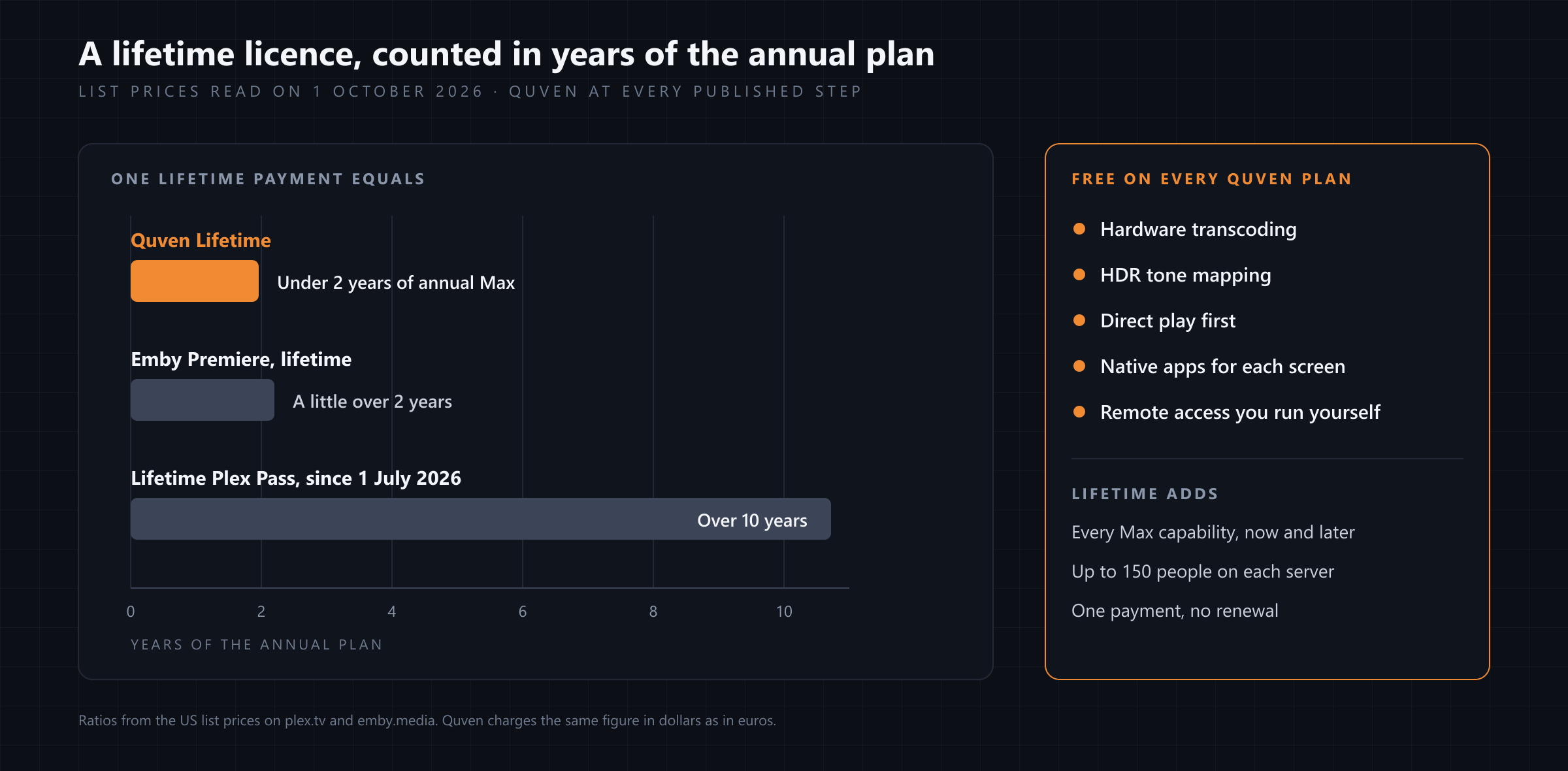
A lifetime licence for a media server pays off when it costs less than the subscription you’d otherwise keep renewing, and when the free plan underneath already covers the basics, so the money you spend goes on things you’ll actually use. Quven is a self-hosted media server by Quven Technologies S.R.L., free for personal use, and its Lifetime plan is every Max capability for a single payment, tied to your account and to every server you link to it. On every step of the published schedule it costs less than two years of the annual Max plan, while hardware transcoding and the remote access you set up yourself stay free whichever plan you hold.
What does a lifetime licence actually buy?
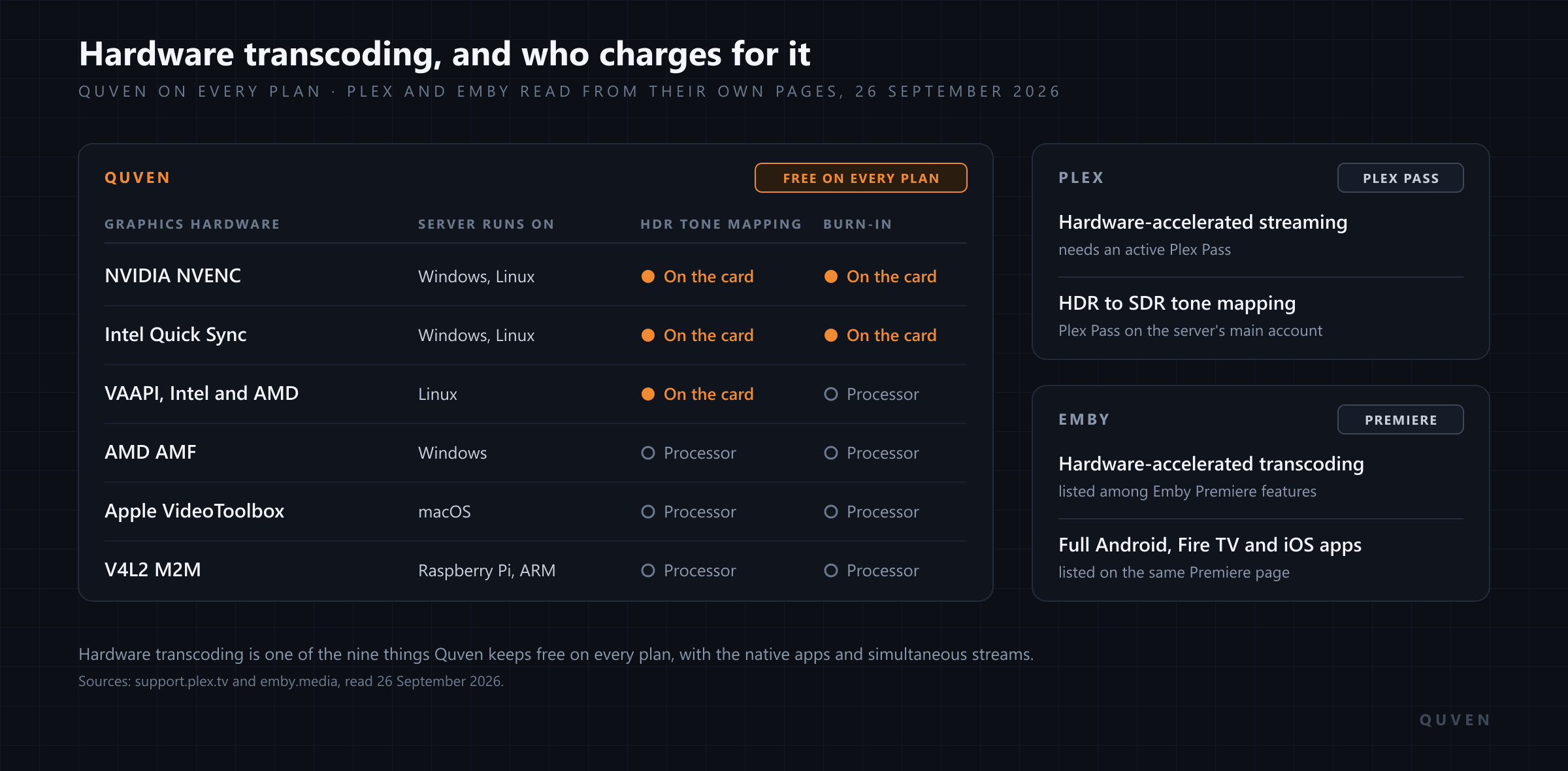
That depends on what the free version leaves out. We read the plan pages of Plex and Emby on 1 October 2026. Plex says its Plex Pass “includes remote streaming for all users, Hardware Transcoding, Downloads, Skip Intro & Credits, and more”, and that every feature is the same whether you pay monthly, yearly or once for a lifetime pass. Emby lists Hardware Accelerated Transcoding among the features of Emby Premiere, beside offline downloads, its DVR and full access to its apps for Android, Fire TV and iOS, and it sells Premiere by the month, by the year or for life. On both servers the lifetime licence is how you’d stop paying, year after year, for the graphics hardware in your own machine to do its job.
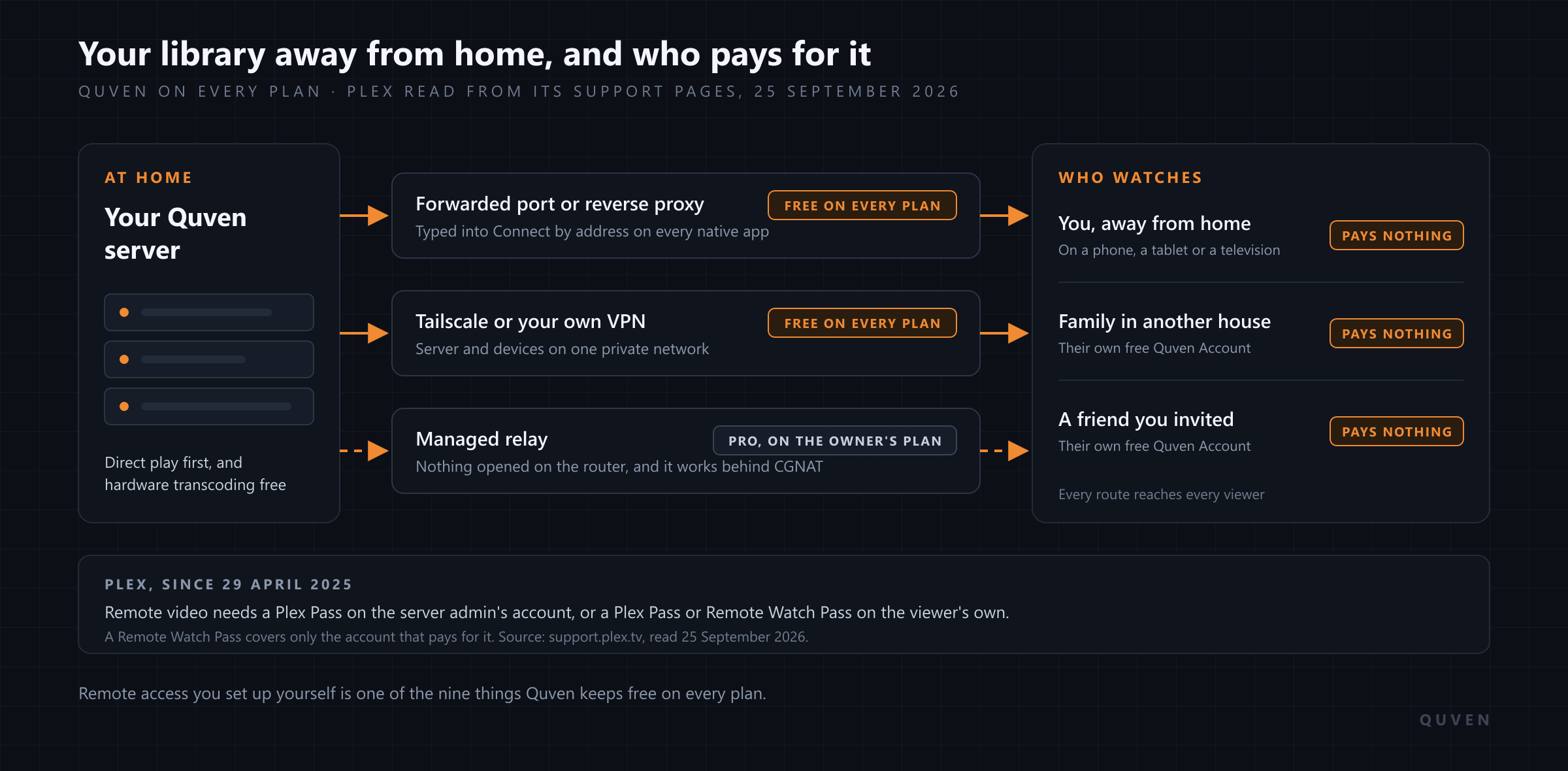
Quven draws the line in another place. The plans page lists nine things that stay free for good: direct play, hardware transcoding, the native apps, subtitles and burn-in, simultaneous streams, quality, updates, no advertising and remote access you run yourself. A capability outside that list can move between plans, and the changelog says so when it does, but those nine can’t. What does a Quven Lifetime pay for, then, if it isn’t the basics? The services Quven runs on your behalf and the advanced tools of Max, and it’ll keep paying for them as Max grows.
| Quven Lifetime | Lifetime Plex Pass | Emby Premiere for life | |
|---|---|---|---|
| Hardware transcoding | Free on every plan, Lifetime or not | A Plex Pass feature | A Premiere feature |
| What the licence adds | Every Max capability as it stands and as Max grows | Every Plex Pass feature, as on the monthly or yearly pass | The Premiere features, paid once |
| What it covers | Your Quven Account, every server linked to it, up to 150 people on each | The account that holds it; server-only features need a pass for each server owner | “Single household use”, with a 30-device limit |
| Lifetime price against the annual plan | Under two years of annual Max, on every published step | Over ten years of the annual Plex Pass since 1 July 2026 | A little over two years of the yearly licence |
The Plex and Emby ratios are taken from the US list prices on their own pages, read the same day. Quven charges the same figure in dollars as in euros, so its ratio holds in both.
What happened to the Lifetime Plex Pass?
Plex has raised the price of a new lifetime pass twice in fourteen months. It more than doubled that price on 29 April 2025, as its post on the 2025 updates had announced, on the day remote playback of personal media stopped being free. A second post, published on 19 May 2026, announced that a new Lifetime Plex Pass would cost three times as much from 1 July 2026, while the monthly and annual prices stayed where they were, and Plex added a five-year recurring Plex Pass at the price the lifetime pass had cost until that day. In the same post Plex wrote that it had “considered eliminating the Lifetime Plex Pass in the past”. Those who already held one kept every benefit, as Plex promised. Anyone who buys one now will pay the new figure.
That’s how a stepped lifetime price works, and it’s why the number that matters is the one on the day you buy. A licence bought before a step is paid for. One bought after it will cost whatever the new step says, though the software it unlocks is the same.
How quickly does Quven Lifetime pay for itself?
By the first renewal. On every step of the schedule the plans page publishes, Lifetime costs less than two years of annual Max, and a subscription renews at the list price published for its renewal day, which on that schedule never sits below the price you started on. Put the first year and its first renewal together and an annual Max subscription has already cost more than a Lifetime bought the same morning would have. Over a whole year a monthly plan costs more again, since the annual plan costs less than twelve monthly payments.
Quven’s own Lifetime price moves as well, and each step is published in advance, so you can see the next one coming. A step only changes what the next buyer pays. A Lifetime that’s already bought has nothing left to pay and no renewal ahead of it. If you’re on Pro or Max today, you can move to Lifetime with a purchase from your billing page, and the paid, unused part of your current plan comes off the Lifetime price, so the months you’ve paid for aren’t lost.
What does Lifetime add to the free plan?
Everything in Pro and Max. From Pro it brings the managed relay, which can reach your server through NAT and carrier-grade NAT with nothing to configure, along with the web client at app.quven.tv. It also brings a subtitle written from a film’s own audio on your own server, automatic scanning with watched folders and scheduled scans, 3D films kept as their own edition, managed AI matching and a cloud backup of the library’s metadata. Max then adds on-demand AI subtitle translation with the cue editor, a repaired copy of a file the scan couldn’t read, 360-degree video on the desktop and the advanced ebook tools, and if you ever need help, its priority email support is answered within 24 working hours.
Two things separate Lifetime from Max itself. You can share each server with up to 150 people instead of 50. And the managed AI allowance, which matching and translation draw on together, starts at its full weekly size on the day you buy, whereas a monthly or annual purchase runs on a smaller one for the fourteen days in which it may still be withdrawn. The article on streaming away from home explains how the relay authorised on your plan lets each guest reach your library without paying anything.
Is Lifetime tied to one server?
No. It belongs to your Quven Account, and every server you link to that account carries it, together with every profile on those servers, and profiles are unlimited on every plan. You might move the server to a new machine next year or run a second one at a relative’s house, and the plan will follow the account either way. Quven is licensed for personal use, which covers you, your family and the guests you invite. Selling other people access to your library isn’t part of it.
What happens when a subscription ends?
The server goes back to the free plan and carries on working. Your library, your profiles, your watch history and the nine free capabilities stay exactly as they were, and what stops is the managed services and the paid tools, until you subscribe again. A Lifetime doesn’t get there, since it has no end date to pass.
Which screens does it reach?
The desktop app runs on Windows and macOS, and the server also runs on Linux and in Docker. Native apps are available for iPhone and iPad, Android phones and tablets, Android TV and Fire TV, each designed for its own screen and asking for the original file first, so a film plays untouched whenever the device can decode it. When a transcode is needed, the server uses the graphics hardware already in your machine and tone-maps HDR for a screen that can’t show it, at no charge on any plan, as the hardware transcoding comparison shows card by card. The web client at app.quven.tv comes with Pro, so it comes with Lifetime too, and apps for Apple TV and for Samsung, LG and Hisense televisions are on the way. Films and series play on all of those screens, and so do documentaries and performances. Hi-res music lives on the same server as your ebooks and comics, and they open in the desktop app and the web client. No plan shows advertising, whichever screen you’re watching on.
Why decide now?
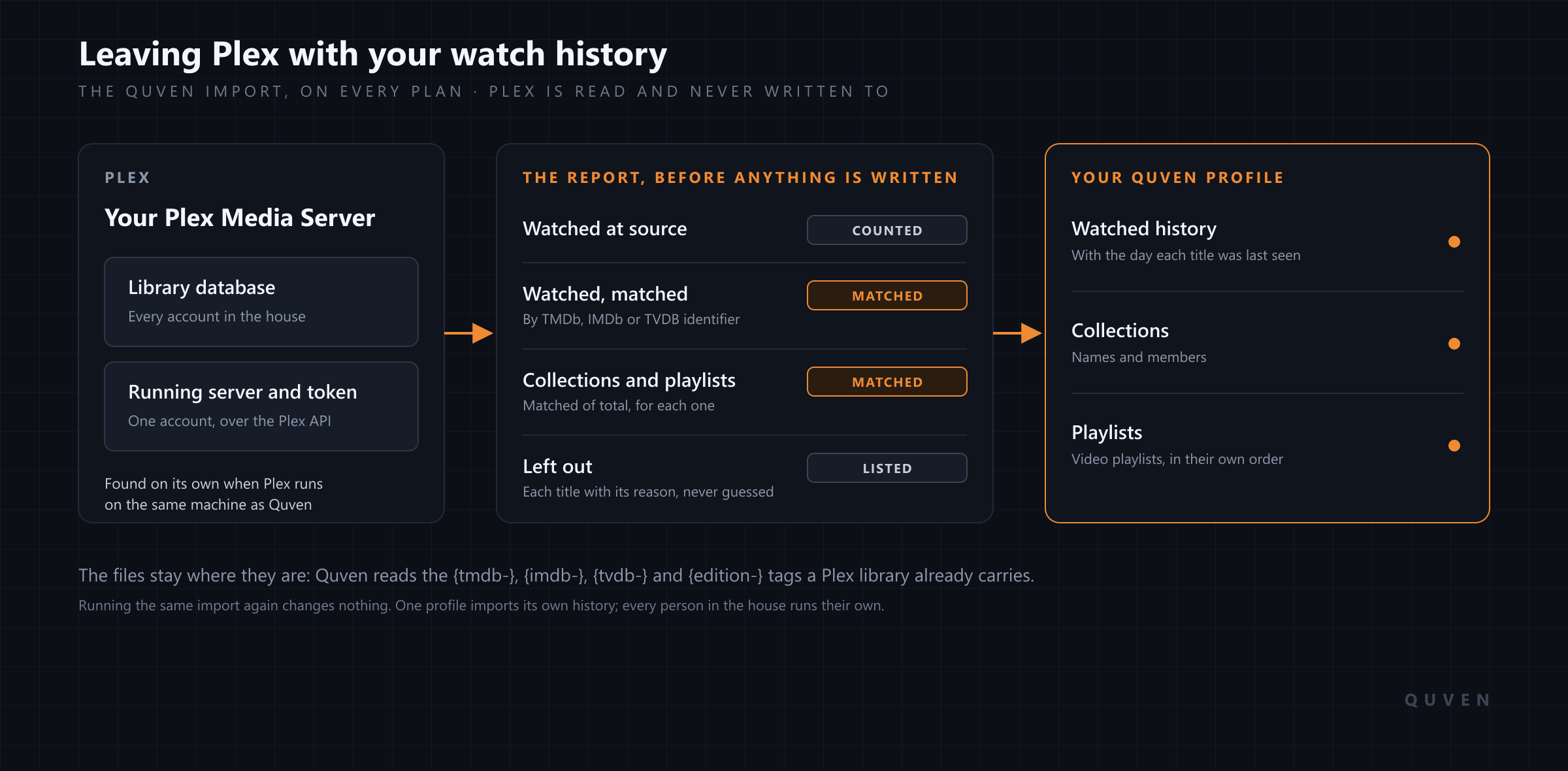
If you’re coming from Plex, you can download Quven today, point it at the folders Plex already reads and bring your watch history and playlists across with the import from the article on leaving Plex, all on the free plan. Once you know you’ll stay, Lifetime is the cheapest way to hold Max for good: one payment, every Max capability now and later, at a price that rises with the next step of the published schedule. You’ll only pay the current step if you buy before it ends, and the offer below shows today’s price.
Frequently asked questions
Is Quven Lifetime a subscription?
No. It’s a single payment with no renewal and no end date, and it carries every Max capability for as long as your account holds it, including the ones Max will gain later.
I already pay for Pro or Max. Can I switch to Lifetime?
Yes. You buy Lifetime from your billing page, your current plan ends once the payment completes, and its paid, unused part is taken off the Lifetime price.
Do I need a paid plan for hardware transcoding or remote access?
No. Hardware transcoding, HDR tone mapping and remote access you set up yourself, through your router, a reverse proxy or Tailscale, are free on every plan. The managed relay, for a connection that can’t forward a port, comes with Pro and with every plan above it.
How many people can I share a Lifetime server with?
Up to 150 on each server, against 50 on Max and 25 on Pro. Every guest signs in with a free Quven Account of their own, and their watch history stays theirs.
Does Quven Lifetime cost less than a Lifetime Plex Pass?
Yes, on every step of Quven’s published schedule, and by a wide margin since Plex tripled its lifetime price on 1 July 2026. Quven also includes on its free plan the hardware transcoding and the remote access you run yourself that Plex places in its paid passes.
Community
Comments
0 comments
No comments yet. Start the conversation.