 Quven
Quven'%3e%3cpath%20d='M0%200v40h60V0z'%20fill='%23012169'/%3e%3cpath%20d='M0%200l60%2040m0-40L0%2040'%20stroke='%23fff'%20stroke-width='8'/%3e%3cpath%20d='M0%200l60%2040m0-40L0%2040'%20clip-path='url(%23d)'%20stroke='%23C8102E'%20stroke-width='5'/%3e%3cpath%20d='M30%200v40M0%2020h60'%20stroke='%23fff'%20stroke-width='13'/%3e%3cpath%20d='M30%200v40M0%2020h60'%20stroke='%23C8102E'%20stroke-width='8'/%3e%3c/g%3e%3c/svg%3e)


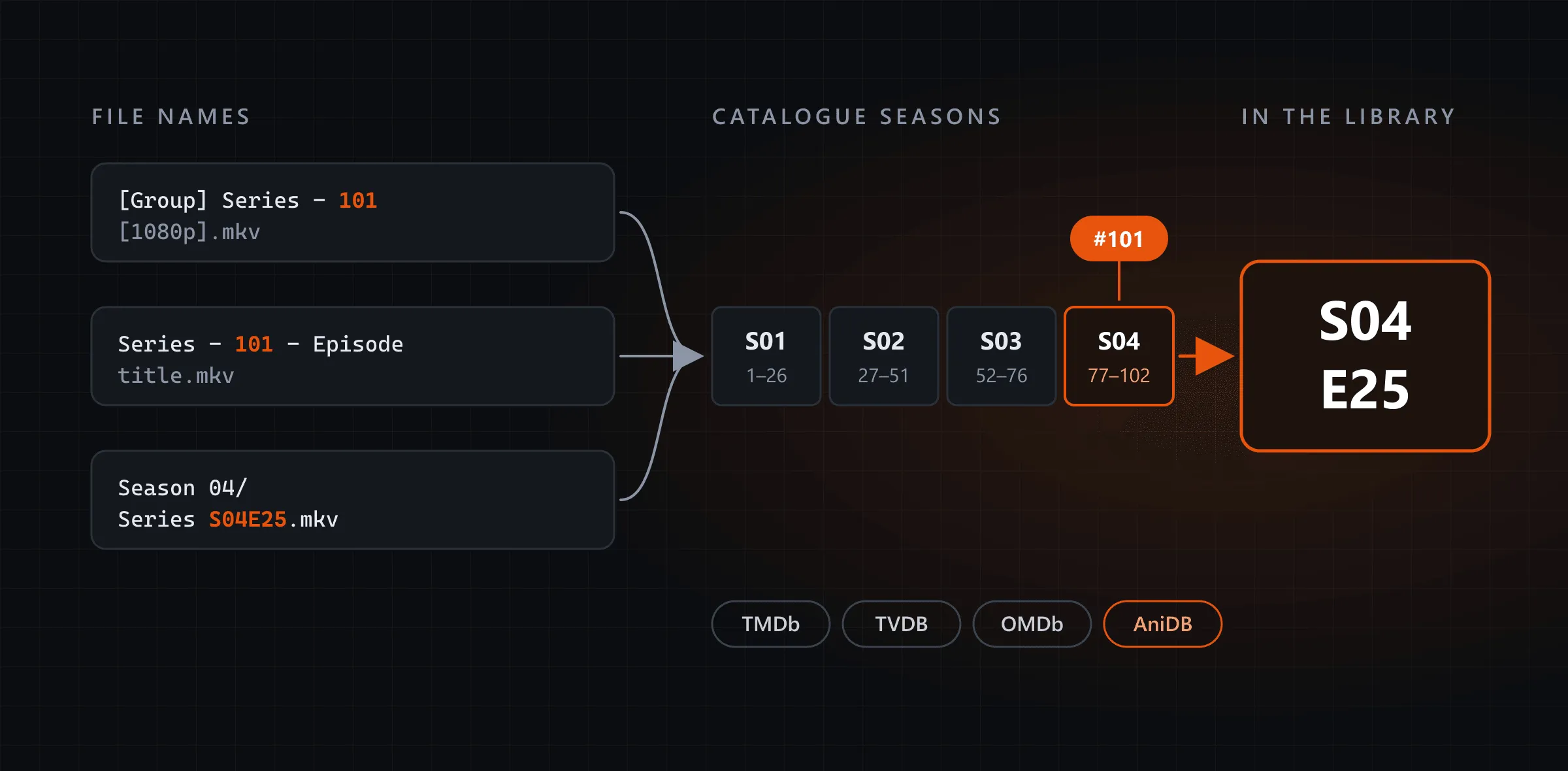
Quven keeps anime in order. It won’t ask you to rename anything first. Quven is a self-hosted media server by Quven Technologies S.R.L., free for personal use, and its scan reads the episode number in an anime file name, absolute or by season, then files the episode in the season and place the catalogue lists. AniDB and TVDB are built in beside TMDb and OMDb, so there’s no plugin to install and no order to pick for each show.
Why do anime episodes land in the wrong order?
Most releases count episodes from 1 to the latest. The catalogues split the same run into seasons. A server that reads episode 101 as season 1, episode 101 finds nothing, or a different episode. TMDb and TVDB don’t always cut the seasons in the same place either, although they agree on the story. So which number should a server trust? The one in the file.
How does Quven read an absolute number?
Two of the shapes the scanner reads:
Anime/
  Series (2019)/
    [Group] Series - 101 [1080p].mkv
Series - 102 - Episode title.mkv- The scan takes 101 from the name, between the group tag and the quality tag.
- It asks the catalogue for season 1, episode 101. When the first season is shorter, it walks the seasons in order and files the episode where the count lands: with a first season of 26 episodes followed by two of 25, number 101 is season 4, episode 25.
- If a season comes back with no episodes listed, every later number would shift, so Quven stops there and asks TVDB’s absolute order rather than guess.
- The episode is stored as season 4, episode 25, so its season page and the next episode to watch read as they would for a file named S04E25.
You don’t need one library for anime and another for everything else, because each file is read on its own, and a series you’ve kept for years under names like S04E25 can sit beside one that carries nothing but a group tag and a number.
Which catalogue should an anime series use?
That’s one setting, in the desktop app or the web client:
Settings › Server › Automatic metadata sources › Anime- Automatic · all catalogues follows the choice you made for series.
- TMDb, TVDB, OMDb or AniDB puts that catalogue first for any series AniDB identifies. The others step in only when it has no result and stay available for manual correction.
- A folder name carrying
{tvdb-…}or{anidb-…}with the series’ number settles which work it is before any search, and a refresh stays on that catalogue.
When no catalogue recognises a romanised title, Match with AI can look the series up from its folder and file names. Managed AI matching comes with Pro.
How do Plex and Jellyfin compare?
On 16 October 2026 we read Plex’s guide to naming TV show files, which says its TV agent uses TMDB’s aired order by default and that “some people like to handle anime series as a single season, using ‘Absolute’ series order”, an order you choose in a library’s Advanced tab, or for one show since Plex Media Server 1.40.4. Jellyfin’s documentation, read the same day, says it ships with TMDb and OMDb and lists TheTVDB and AniDB among the plugins you install from its catalogue, a difference that reaches well beyond anime, as our Jellyfin comparison shows.
| Quven | Plex | Jellyfin | |
|---|---|---|---|
| TVDB and AniDB | Built in, beside TMDb and OMDb | TMDB by default, TheTVDB by choice | Plugins from its catalogue |
| A file numbered 101 | Filed in its season by the scan | Read once TheTVDB (Absolute) is set | Its guide names episodes S01E01 in season folders |
| A choice for anime | Anime, in Automatic metadata sources | One order per library, or per show | Several anime metadata plugins |
What else does an anime library get?
- The original file first. The native apps play what’s on the disk, and when a screen can’t, hardware transcoding does the work on the free plan.
- Your history. Quven imports watch history and playlists from Plex or Jellyfin on every plan, as the article on leaving Plex shows.
- Your screens. The desktop app runs on Windows and macOS, the server on Linux too. Native apps cover iPhone and iPad, and one Android app covers phones, tablets, Android TV and Fire TV, as the comparison of the apps sets out. The web client at app.quven.tv comes with Pro, and apps for Samsung and LG televisions and for Apple TV are on the way.
Why choose Lifetime now?
A long-running series can keep adding seasons for a decade. The server that holds it should last as long. Lifetime is every Max capability for one payment, including the ones Max gains later, and its price rises at each step of the published schedule. If you’d rather renew, the annual plan costs less than twelve months. The plans page sets out what each one adds, and you can download Quven today.
Frequently asked questions
Do I have to rename my anime files?
No. Absolute numbers with group tags in brackets are read as they are, and the organisation guide shows the folder shapes that help most.
Where do OVAs and specials go?
In a folder named Specials inside the series, which Quven reads as season 0, where the catalogues list them.
Do I need a paid plan to use AniDB?
No. Choosing the catalogue and matching against all four cost nothing on any plan, and only managed AI matching needs Pro.
Community
Comments
0 comments
No comments yet. Start the conversation.