Quven
Quven'%3e%3cpath%20d='M0%200v40h60V0z'%20fill='%23012169'/%3e%3cpath%20d='M0%200l60%2040m0-40L0%2040'%20stroke='%23fff'%20stroke-width='8'/%3e%3cpath%20d='M0%200l60%2040m0-40L0%2040'%20clip-path='url(%23d)'%20stroke='%23C8102E'%20stroke-width='5'/%3e%3cpath%20d='M30%200v40M0%2020h60'%20stroke='%23fff'%20stroke-width='13'/%3e%3cpath%20d='M30%200v40M0%2020h60'%20stroke='%23C8102E'%20stroke-width='8'/%3e%3c/g%3e%3c/svg%3e)


Quven gives audiobooks a library kind of their own. It reads a book as an ordered run of parts with chapters on top, keeps your place for each profile and opens it on whichever device you pick up next. Audiobook libraries are experimental in this first release, so some behaviour may still change between versions.
1. Create the library
- Create an Audiobooks library and give it a folder of its own.
- Keep audiobooks and music in separate roots. A music library reads books as albums and puts narrators on the artist shelf.
Quven reads .m4b, .m4a, .mp3, .opus, .ogg, .flac and .aac. Nothing needs converting first.
2. Lay out the folders
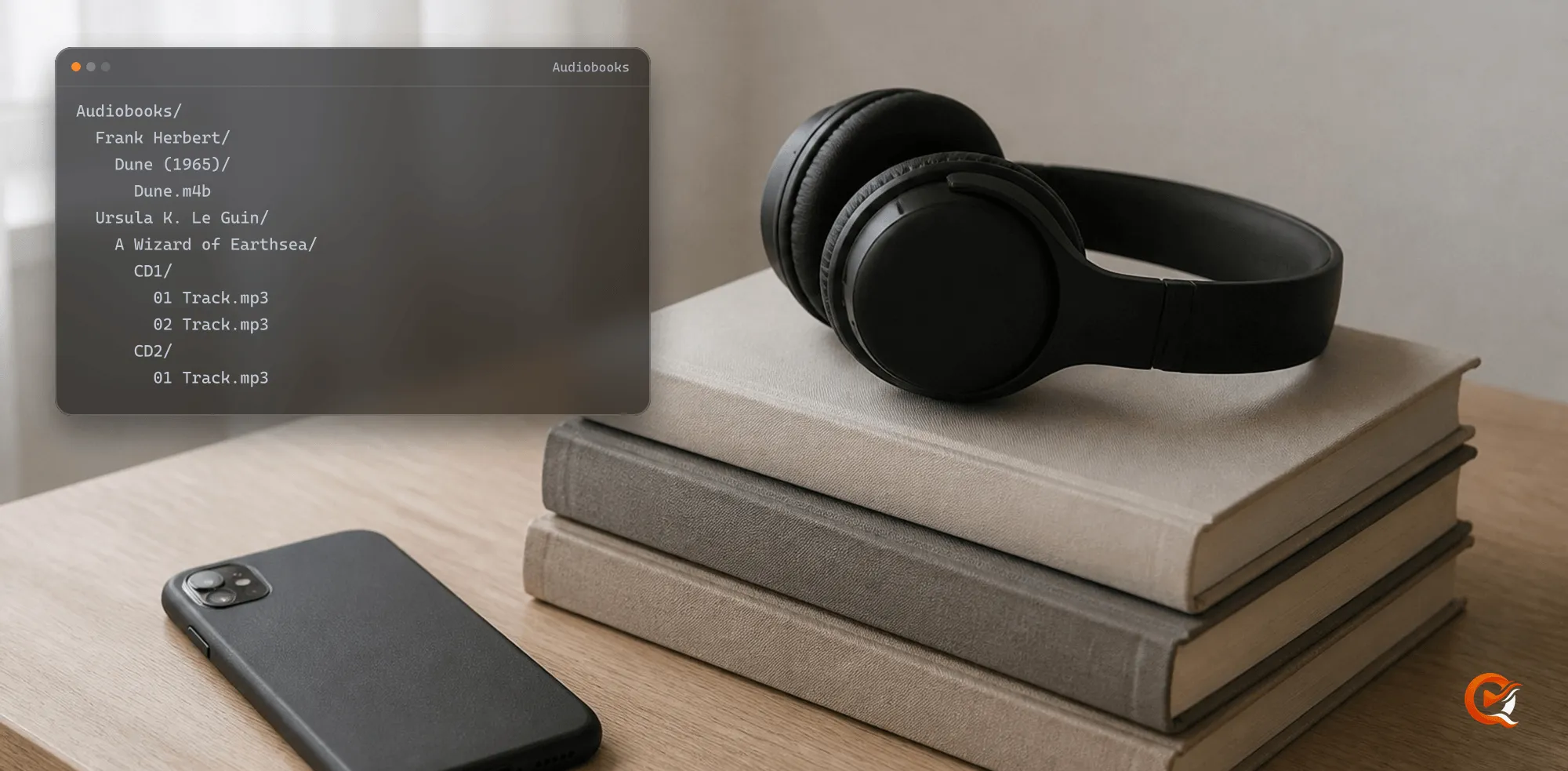
A folder holding audio files is one book, and a lone .m4b is a book by itself. This layout reads as three books:
Audiobooks/
  Frank Herbert/
    Dune (1965)/
      Dune.m4b
  Ursula K. Le Guin/
    A Wizard of Earthsea/
      CD1/
        01 Track.mp3
        02 Track.mp3
      CD2/
        01 Track.mp3
Mary Beard - SPQR.m4b- Folders called
CD1,CD 2orDisc 1fold into the folder above, so Earthsea’s two discs become one book. - Parts play in the order their tags give, disc first and then track. Without tags, Quven uses natural order, so
Track 2comes beforeTrack 10. - A folder holding the MP3s of several books reads as one very long book. Give each title its own folder before the first scan.
- Several
.m4bfiles side by side are different: each is a book of its own.
3. Chapters
An .m4b usually carries its chapters inside the file, and Quven reads them as they are. A book made of many MP3s often has none, so every part becomes a chapter.
Every chapter is listed on the book’s page, where a press starts playing it. “Previous chapter” goes back to the start of the chapter playing or, within its first three seconds, to the chapter before it.
4. Tags, the ASIN and Audnexus
Matching starts from what the files say:
- With an ASIN in the tags, the identifier Audible gives each book, Quven asks Audnexus for the narrator, the series, the cover and the description. The request goes through Quven’s managed proxy, not straight from your server.
- Without an ASIN, an ISBN is looked up in the book catalogues Quven uses for ebooks.
- After that, a title and author search.
A book nothing recognises stays in the library under the names its tags give. Identify it by hand from its page, searching by title, author or ASIN. A later scan reads your choice back instead of guessing again, and an automatic scan never replaces a match you made. The scan asks no AI at any step; with Pro, Max or Lifetime an administrator can also choose Match with AI from the book’s card menu.
5. Listen across devices
Stop halfway through a chapter on the desktop and the Android phone opens the same book at the same second. The position is reported every ten seconds and whenever you pause. Past ninety-five per cent the book counts as finished and leaves the listening rail on Home.
- Every profile can skip thirty seconds either way and move between chapters.
- With Pro you can change the speed, from three quarters up to three times normal, and set a sleep timer for fifteen to sixty minutes or for the end of the chapter. The last five seconds fade out, so the narrator doesn’t stop mid-word.
- Audiobooks play on the desktop, in the web client, on Android phones and tablets, and on iPhone and iPad. Television apps don’t show them.
Checklist before the first scan
- One root folder for audiobooks, apart from music.
- One folder per book, with disc folders named
CD1,CD2orDisc 1. - An ASIN in the tags wherever you have one.
- A cover image in the folder if the files don’t embed one.
Anything Quven can’t place still plays, and you can tidy the names later without losing anyone’s place in the book.